
Losing a phone is stressful, and in the search for solutions, many people come across claims that Google Earth can track a device using its IMEI number. These claims often appear convincing, especially when paired with satellite images or “IMEI lookup” tools that promise instant results. But how much of this is true?
This comprehensive guide breaks down the facts, explains what IMEI numbers can and cannot do, and explores legitimate ways to locate a lost phone. You’ll also learn how Google Earth fits into the picture—and where its limitations lie.
Part 1: Can Google Earth Track an IMEI Number?
The short answer is no—Google Earth cannot track a phone using its IMEI number. This misconception persists because IMEI numbers are often associated with device identification and security, but they do not contain any location‑based information.
What an IMEI Number Actually Does
An IMEI (International Mobile Equipment Identity) is a unique 15‑digit code assigned to every mobile device. It serves several important functions:
- Identifies the device on mobile networks
- Helps carriers block stolen phones
- Assists law enforcement during investigations
- Confirms device authenticity
However, the IMEI does not include GPS data, does not broadcast a location, and cannot be used by the general public to track a device.
Why Google Earth Cannot Track IMEI Numbers
Google Earth is a visual mapping and exploration tool, not a tracking platform. It displays satellite and aerial imagery, allowing users to explore the world in 2D and 3D. It does not connect to:
- Mobile carrier databases
- IMEI registries
- GPS chips inside phones
- Real‑time tracking systems
Because of this, Google Earth has no ability to locate a device based on its IMEI.
Who Can Track IMEI Numbers?
Only authorized entities can perform IMEI‑based tracking:
- Mobile network operators
- Law enforcement agencies
- Government‑approved security units
Even then, IMEI tracking typically uses cell tower triangulation, not satellite imagery.
When Google Earth Can Help
While Google Earth cannot track IMEI numbers, it can display a location if you already have GPS coordinates. Many tracking apps provide coordinates that you can paste into Google Earth to visualize the area in detail.
Part 2: How to Use Google Earth to Locate a Position
Google Earth is a powerful tool for visualizing locations, exploring terrain, and examining satellite imagery. While it cannot track devices directly, it can help you understand or verify a location when you have coordinates.
How to View Your Location on Google Earth
- Open Google Earth on your computer or mobile device.
- Click the Location icon (a small target symbol).
- After a moment, Google Earth zooms in on your current position.
How to Enter Coordinates in Google Earth
If you have GPS coordinates from a tracking app:
- Open Google Earth.
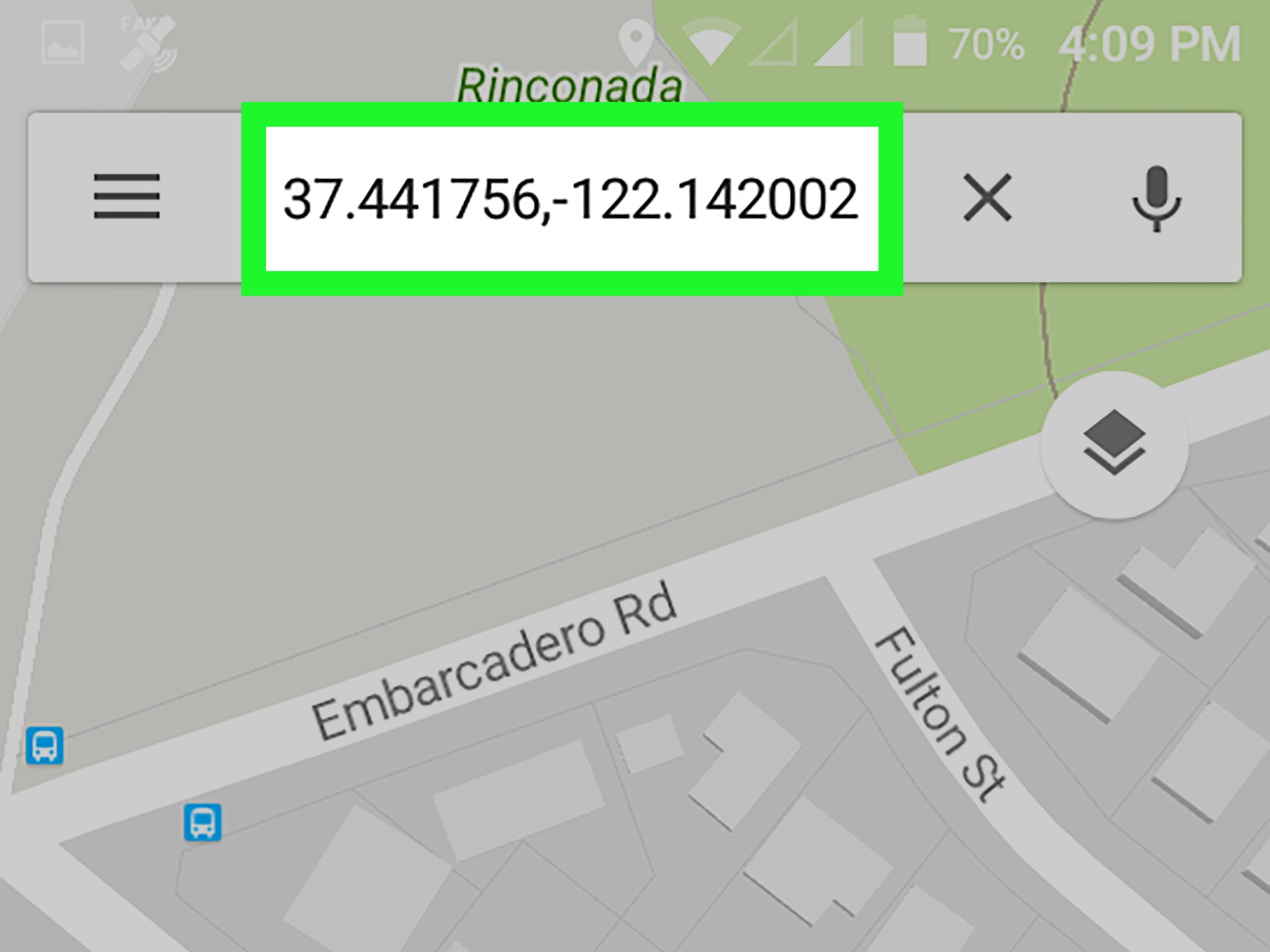
- Type the coordinates into the Search bar.
- Press Enter.
- Google Earth will fly to the exact location on the map.
This feature is especially useful when you want a more detailed or 3D view of an area provided by another tracking service.
Part 3: Limitations of Using Google Earth for Tracking
Google Earth is not designed for real‑time tracking, and several limitations prevent it from functioning as a phone‑tracking tool.
1. No Real‑Time Location Data
Google Earth displays static imagery, not live updates. Even the most recent satellite images are not real‑time.
2. No Access to IMEI or Device Identifiers
Google Earth cannot read or interpret IMEI numbers, SIM card data, or mobile network information.
3. Requires GPS Coordinates
To locate a position, Google Earth needs latitude and longitude. It cannot generate these coordinates on its own.
4. Lacks Tracking Features
Unlike dedicated tracking apps, Google Earth does not offer:
- Location history
- Geofencing
- Alerts
- Device locking
- Remote erasing
5. Not a Security or Recovery Tool
Google Earth is a visualization platform, not a phone recovery service. It cannot replace tools designed specifically for device tracking.
Part 4: Alternative Methods to Phone Locating — GPS Tracking
Since Google Earth cannot track IMEI numbers, the best alternatives are GPS‑based tracking tools. These services are designed to locate lost or stolen devices safely and legally.
Google Find My Device (Android)
Google Find My Device is a free, built‑in tool for Android users. It allows you to:
- View your device’s location
- Play a sound
- Lock the device
- Erase data remotely
- See location history
Pros
- Free and easy to use
- Works with all Android devices linked to your Google account
- Includes remote security features
Cons
- Only works if location services were enabled
- Requires internet or network connection
- Accuracy varies based on GPS signal
Apple Find My (iPhone, iPad, Mac)
Apple’s Find My network uses GPS, Bluetooth, and crowd‑sourced Wi‑Fi data to locate devices—even when they’re offline.
Pros
- Built into all Apple devices
- Can locate devices even when offline
- Supports multiple devices under one Apple ID
Cons
- Only works with Apple products
- Requires location services to be enabled
- Accuracy depends on signal strength
FreeSpy Family Tracker (Android)
This tool is designed for family safety and parental monitoring. It allows you to:
- Track real‑time location
- View location history
- Set geofences
- Receive alerts when someone enters or leaves a zone
Pros
- Real‑time GPS tracking
- Supports geofencing
- Provides quick alerts
Cons
- Requires account creation
- Free version has limitations
- Requires permissions on the target device

Part 5: Personal Experiences and Tips for Using Location Tracking Tools
Many people first turn to Google Earth because of its detailed satellite imagery, but real‑world experience quickly reveals its limitations for tracking devices. Over time, several practical lessons emerge when using tracking tools effectively.
1. Enable Tracking Features Before You Need Them
Most tracking tools require:
- Location services
- Internet access
- Account login
If these settings are disabled, tracking becomes difficult or impossible.
2. Keep Your Device Connected
A phone without internet access cannot send its location. Even a brief connection can update its last known position.
3. Understand Each Tool’s Capabilities
For example:
- Google Find My Device and Apple Find My allow locking and erasing.
- Family tracking apps offer geofencing and history logs.
- Google Earth only visualizes coordinates—it does not track anything.
4. Use Strong Security Practices
Setting up:
- Screen locks
- Two‑factor authentication
- Backup accounts
…can help protect your data if your device is lost.
5. Act Quickly When a Device Goes Missing
The sooner you use a tracking tool, the higher the chance of recovering your phone.
Part 6: FAQs About Tracking IMEI Numbers with Google Earth
Can Google track my IMEI number?
Google does not track IMEI numbers. If you enable location services, Google may track your device’s location—but this is separate from the IMEI.
Can I track an IMEI number using online tools?
Most online IMEI trackers are unreliable or unsafe. Legitimate IMEI tracking is handled by carriers and law enforcement.
Can I track someone using their IMEI number?
Tracking someone without consent is illegal. IMEI‑based tracking requires authorization and is not available to the public.
Can my internet activity be tracked through my IMEI?
No. The IMEI identifies your device but does not reveal browsing history or internet usage.
Do law enforcement agencies use IMEI tracking?
Yes, but only with proper authorization. These tools are not available to the public.
Do real IMEI trackers exist?
Some legitimate tools exist, but they require:
- Prior installation
- Enabled location services
- User permissions
They cannot track a device solely by IMEI.
Final Thoughts
Google Earth is a remarkable tool for exploring the world, but it is not designed for tracking phones or IMEI numbers. The IMEI is a hardware identifier, not a location beacon, and only carriers or law enforcement can use it for investigative purposes.
For everyday users, the safest and most effective options are GPS‑based tools like Google Find My Device, Apple Find My, or family tracking apps. These services offer real‑time updates, security features, and reliable methods for locating a lost phone.
Always use tracking tools responsibly, legally, and with respect for privacy.