“This is the fraud department at your bank. We’ve flagged two suspicious charges on your debit card and we need to secure your account right now.” The screen shows your bank’s name. The caller knows your name and the last four digits of your card. It sounds like help.
Banks do call about fraud, so the call itself proves little either way. What separates a real alert from a fake one is what the caller asks you to do next, and there are four requests a real bank will not make.
Your instinct to protect your money is the target
Most people have had a real fraud alert at some point, and scammers borrow that experience. They bring a problem that sounds plausible, a fix that sounds responsible, and a deadline that leaves no room to think.
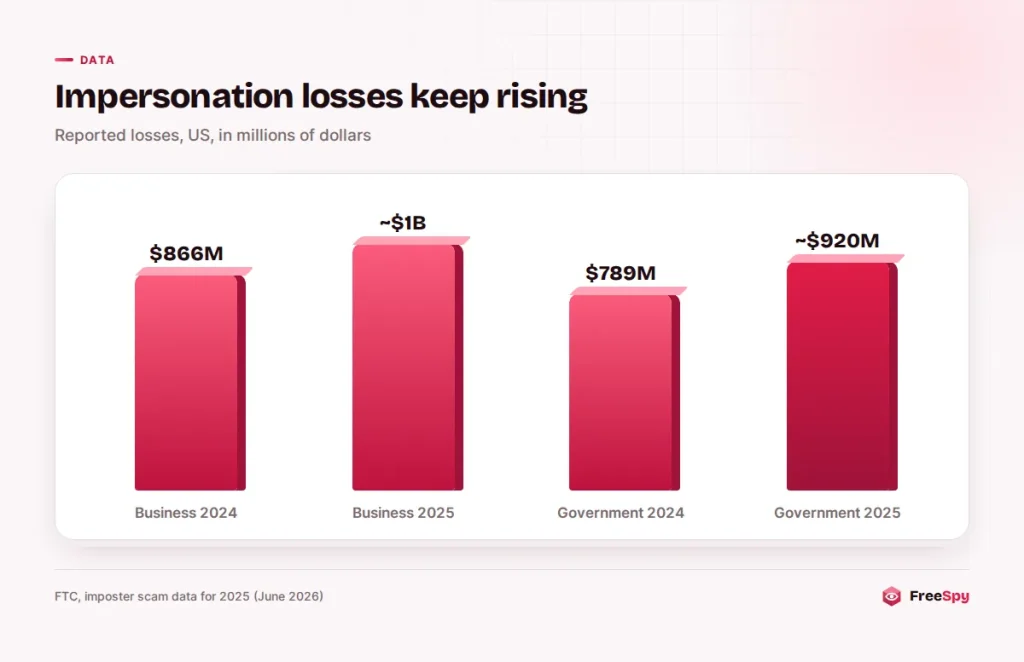
It works. According to the FTC, people reported losing nearly $1 billion to business impersonators in 2025, up from $866 million in 2024, and bank impersonators caused the highest losses among them. The FTC also notes that many of the costliest scams begin with a fake security alert, often one that claims to come from a bank.
The callers come prepared. Names, addresses, email addresses and partial card numbers circulate after data breaches. The Canadian Anti-Fraud Centre points out that scammers may quote the first 4 to 6 digits of your card to sound credible, even though those digits only identify the card issuer and are shared by many customers. Some callers also invent “recent purchases” and wait for you to correct them.
Three ways the call reaches you
A YES/NO text, then a “specialist”
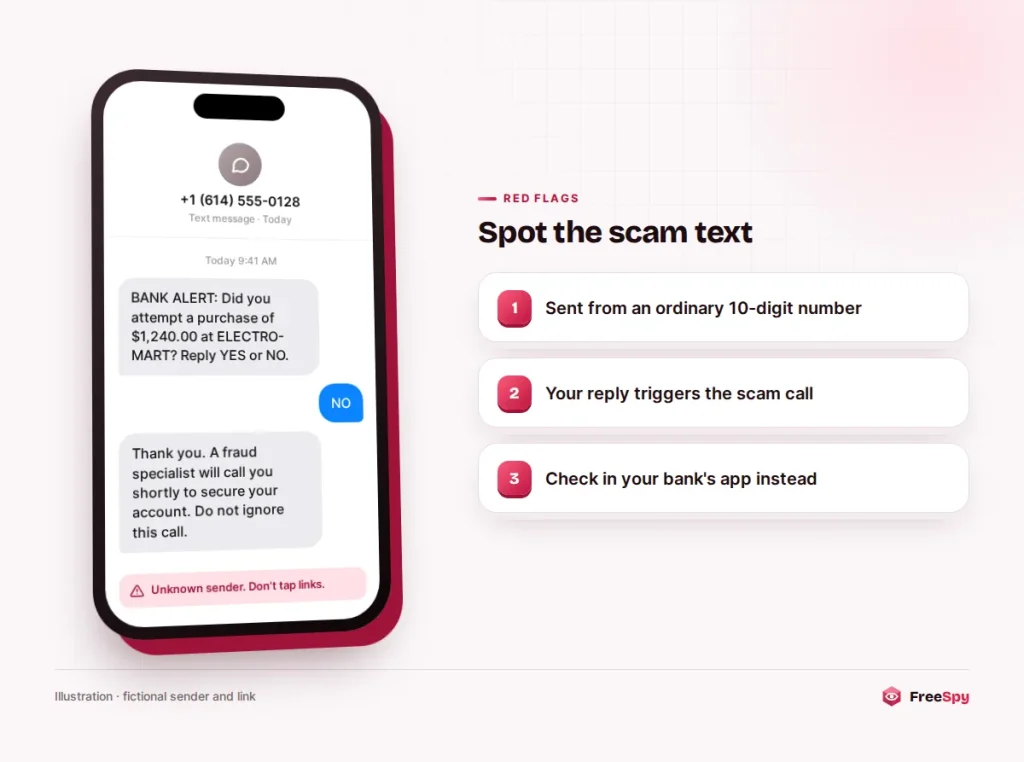
Fake fraud alerts were one of the FTC’s top five text scams in 2024. The message asks whether you made a purchase and tells you to reply YES or NO. Reply NO, and a “fraud specialist” calls within minutes. Because you just answered an alert, the call feels expected. It’s one of several common scam texts that hand you straight to a caller.
A robocall with “press 1”
A recorded voice says a large charge was attempted on your card and offers to connect you to the fraud team. Pressing 1 puts you through to a live scammer who already knows you’re worried.
Your bank’s own number on the screen
Sometimes the display shows your bank’s name or its real customer service number. That’s spoofing, and it’s why the CAFC warns: “Do not assume that phone numbers appearing on your call display are accurate.” Call authentication catches some spoofed calls but not all of them, for reasons covered in this explainer on STIR/SHAKEN’s limits.
A real alert only wants a yes or a no
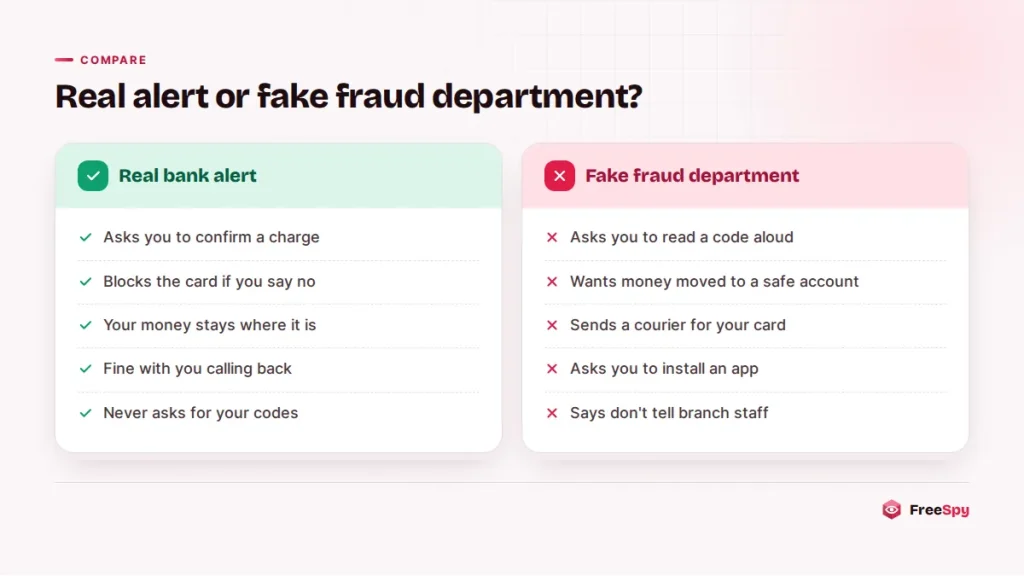
Real and fake alerts can open the same way, so watch what comes next. A real alert asks you to confirm or deny a transaction. If you deny it, the bank typically blocks the card and sends a replacement. Your money stays put, and nobody needs anything from you beyond that answer.
When you call your bank yourself, it may send a one-time code to confirm your identity. That’s normal. The difference is direction. A code is something you type into the bank’s app or website, or use on a call that you placed to the number on your card. The FTC is blunt that no legitimate caller, including a bank’s fraud department, will ever ask you to read them a verification code.
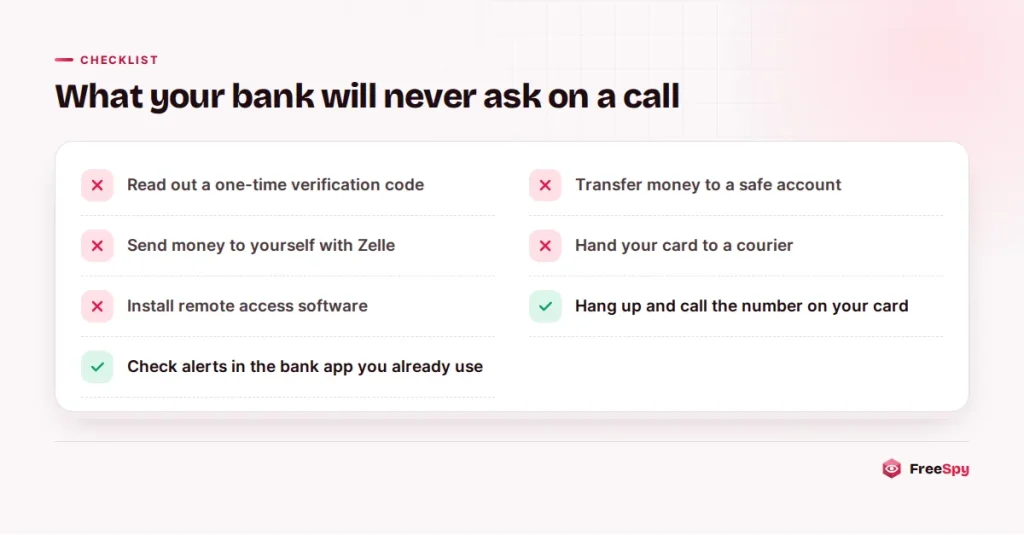
Four requests your bank won’t make
A fake call ends with one of the requests below. Hear any of them and you can hang up without working out the rest of the story.
“Read me the code we just sent you”
“To cancel the fraudulent charge, I’ve sent a verification code to your phone. Please read it back to me so I can confirm it’s you.”
That code rarely has anything to do with canceling a charge. It’s what your bank sends when someone tries to log in, reset your password, add a payee or link your account to a payment app. Reading it out hands over the key. The FTC: “Never share a verification code. Ever.”
“Move your money to a safe account”
“Your account is compromised, including from the inside. We’re opening a protected account in your name. Transfer your balance now, and don’t discuss this with branch staff.”
A “safe account” set up by a caller belongs to the caller. The FTC says your bank will never contact you to tell you to transfer money, and that you should never move or transfer your money “to protect it.” Variations have you withdraw cash for a courier, buy cryptocurrency, or send money to yourself through Zelle. And anyone coaching you on what to tell your own bank’s staff is not on your side.
“We’ll send someone to collect your card”
“We need the physical card for the investigation. Cut it in half, put it in an envelope, and a courier will pick it up within the hour. Please confirm your PIN so we can deactivate it.”
The CAFC describes this exact version: fraudsters say they need your card for the investigation and send someone to your home to collect it, sometimes after telling you to cut it in half. With the chip intact and your PIN, the card still works. Banks don’t collect cards at the door.
“Install this app so I can check your device”
Some callers want remote access software installed to “scan for hackers” or to show you the fraudulent transactions. The CAFC describes scammers using remote access to display a fake transaction in what looks like your online banking. Once they can see your screen, they can watch you log in. The CAFC’s advice is simple: never give anyone remote access to your computer.
When the “bank” passes you to a federal agent
Some versions don’t stop at the bank. Once you’re frightened, the “bank” transfers you to someone claiming to be from the FTC, the FBI, the police or, in Canada, the RCMP or the CAFC. The new voice confirms the story and raises the stakes: your identity was used in a crime, and your money has to move to prove you weren’t involved.
“I’m transferring you to the federal officer assigned to your case. Your bank believes an employee is involved, so do not speak to anyone at your branch. You’ll receive instructions for moving your savings into a government-protected account today.”
Notice how each new voice closes another exit. The branch is “compromised,” the police are “already involved,” and telling family would “tip off the suspects.” The more people you are told to avoid, the more certain it is a scam. Agencies don’t do this. The FTC says it will never demand money, make threats or tell you to transfer money.
Checking with your bank in two minutes
Asking the caller security questions won’t settle anything, since a scammer can answer with stolen data or bluff. Verify without using anything the caller gave you:
- Hang up. “I’ll call the number on my card” is enough. A real bank won’t object.
- Switch phones if you can. The CAFC suggests calling from a different phone, or waiting 10 minutes before calling out, in case the line is still being held open.
- Call the number on the back of your card or on your statement and ask, “Is there a fraud alert or block on my account?” A real alert will be visible to them.
- Or open your bank’s app. Real alerts usually appear there or in your account messages.
- Look up the number that called. Because spoofed calls can show your bank’s real number, a clean lookup proves nothing. But many scam numbers carry community reports along the lines of “said they were my bank’s fraud team,” and that can confirm what you suspected.
Replying YES or NO to an alert from your bank’s usual short code is normal. A text that asks you to call a number, tap a link or wait for a call is a different thing; check it in the app instead.
The “bank investigator” version in Canada
Canadians meet the same scheme under the name “bank investigator” or “fraud investigator.” In its 2025 figures, the Canadian Anti-Fraud Centre recorded 2,167 reports of fraud investigator scams, with 1,137 victims and $28.3 million in reported losses. The CAFC’s warning signs: banks and police don’t threaten people over the phone, credit bureaus don’t make unsolicited calls, and nobody legitimate needs your card, your one-time codes or remote access to your computer.
A common Canadian twist adds you as an Interac e-Transfer payee using an email address the scammer controls, then tells you to move funds to “protect” your account. The CAFC suggests turning on Auto-Deposit for Interac e-Transfers as an extra layer of security. Report these calls to the CAFC online or at 1-888-495-8501.
Read out a code or moved money? Call within the hour
What to do depends on what the caller got from you. Whatever it was, call your bank’s real number first, today rather than tomorrow.
If you read out a code, tell the bank exactly when. Ask them to review recent logins, new payees and linked payment apps, and change your online banking password.
If you moved money, ask the bank to try to stop or recall the transfer. The FTC notes that bank accounts have fewer protections than credit cards, so the money may not come back, which is exactly why speed matters.
If you handed over your card or PIN, cancel the card right away and go through recent transactions.
If you installed an app, disconnect the device from the internet, remove the app, and have the device checked before you log in to anything again.
Then report it: in the US to the FTC at ReportFraud.ftc.gov, and in Canada to the CAFC. Filing a report on the number under bank/card fraud also warns the next person who looks it up. If the caller also collected your Social Security number or SIN, deal with that as a separate identity problem once the money side is handled.
Sources
- FTC: Imposter scam losses in 2025
- FTC: Got a call about fraud activity on your bank account?
- FTC: Never move your money to “protect it”
- FTC: Payment apps like Venmo, Cash App or Zelle
- FTC Data Spotlight: Top text scams of 2024
- Canadian Anti-Fraud Centre: Bank investigator
- Canadian Anti-Fraud Centre: Top frauds of 2025