Finding your own number on a scam-report site is unsettling, especially when you know you never made those calls. Most of the time there’s a simple explanation, and there are several ways to fix it. This page explains why it happens, what a removal request does, and what else you can do if your number is being misused.
Key takeaways
- The most common reason an innocent number collects reports is caller ID spoofing: scammers display your number without having access to your phone.
- An approved removal hides all community reports, comments and caller names for your number and tells search engines to drop the page.
- We review requests within 72 hours and email you the result.
- Removal doesn’t stop spoofing. Tell your carrier, keep a record, and report the misuse.
- Businesses can ask for a verified label through the contact page instead of hiding reports.
Why your number may show reports
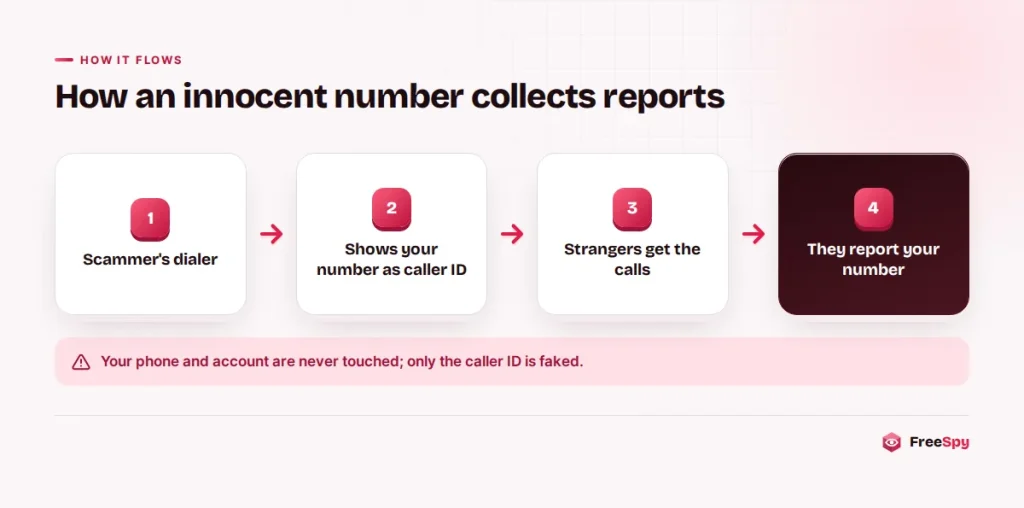
Your number is being spoofed
Caller ID can be faked. A scammer’s dialing software can show any number it likes, and it often picks numbers that look local to the person being called. If your number is chosen, hundreds of strangers may see it on their screens in a single afternoon. Some call it back angrily, and some report it. You did nothing, and your phone was never touched.
Signs that this is happening: you get calls or texts from strangers asking “why did you call me?”, you see reports describing robocalls you never made, or reports say the caller claimed to be a bank or a government agency. Our article on caller ID spoofing and STIR/SHAKEN explains how this works and what carriers do to catch it.
Your number was recycled
Carriers reassign numbers after the previous owner cancels. If you got your number recently, reports from months ago may describe how its last owner used it, whether that was a sales operation, a debt collector, or simply someone whose friends kept calling. Reports lose weight over time (their effect on the score halves every 60 days), but older comments can still be read on the page.
A dispute or a misunderstanding
Sometimes the calls were real but the reports aren’t fair. A legitimate business that makes many calls, such as a clinic, a contractor or a delivery service, can collect reports from people who didn’t recognize the number. A debt collector calling the wrong person may be reported as a scam. Occasionally someone uses a report to settle a personal grudge, which breaks our community guidelines.
What removal does, and what it doesn’t
When we approve a request, three things happen:
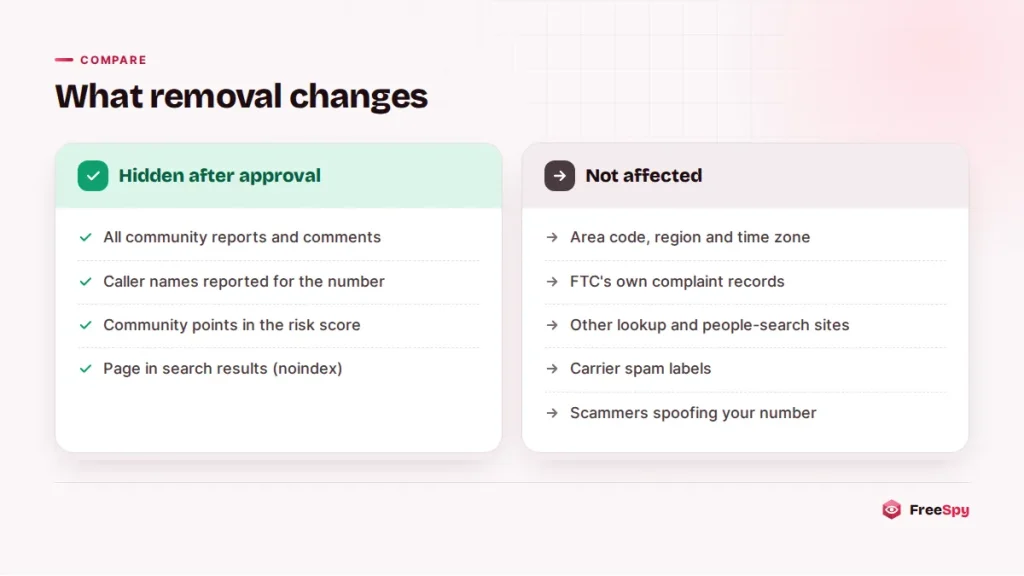
- Reports are hidden. All community reports, comments and caller names reported for your number are removed from public view, and the reports section is no longer shown on the page.
- The community score is cleared. Hidden reports stop counting toward the risk score.
- Search engines are told to drop the page. The number page is set to noindex. It takes search engines some time to process this, so it may still appear in results for a while.
The page shows a short note that the owner opted out. Some things stay:
- Numbering-plan facts. The area code, region, time zone and original carrier of the exchange describe the area code and the exchange, not you. Anyone can find them in public numbering records.
- Government complaint records. FTC Do Not Call complaints are public data published by the FTC. Hiding community reports on FreeSpy doesn’t change the FTC’s own records.
- Other services. Removal applies only to FreeSpy. Other lookup sites, people-search sites and your carrier’s own “spam likely” labels are run separately. You’ll need to contact them directly.
Removal also can’t stop someone from spoofing your number. It cleans up the record here; the steps further down deal with the cause.
How to request removal
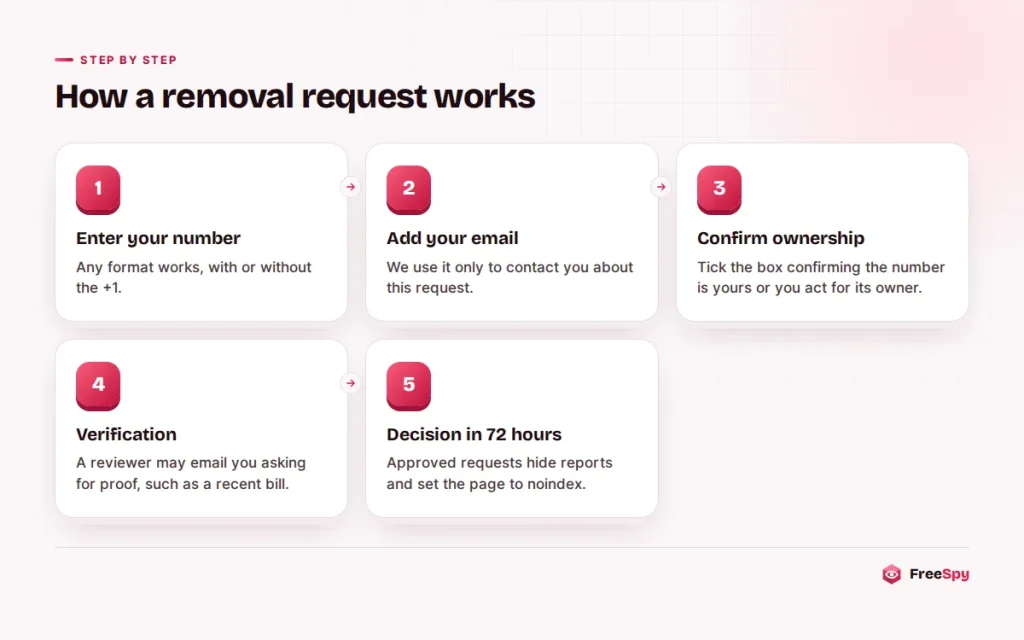
- Enter your number in the form above, in any format.
- Give an email address where we can reach you. We use it only for this request.
- Add a reason if you like. One or two sentences help: “I’ve had this number for 8 years and started getting angry callbacks last week” tells us a lot.
- Confirm that the number is yours or that you’re authorized to act for its owner, such as a business you work for or a family member’s line you manage.
- Submit. You’ll see a confirmation on screen.
Verification
We need to be sure the request comes from the person who controls the number. Otherwise a scammer could hide the warnings on their own number. A reviewer checks every request and may email you to ask for proof, such as a recent phone bill with the account number blacked out, showing your name and the number. Please don’t send copies of ID documents unless we specifically ask. We never ask for passwords, PINs or one-time codes, and an email claiming to be from us that does is a scam.
Timeline
We review requests within 72 hours. If we approve it, you’ll get an email, and the change shows on the page shortly after. If we need more information, we’ll reply to the same address. If a number has heavy, recent scam activity and we can’t confirm ownership, we may decline and explain why.
Alternatives to removal
Hiding reports isn’t always the best fix. If people keep receiving spoofed calls with your number, the reports may be helping them. Two other options leave the page visible but tell the right story.
Add a “Safe” report
Use the form on your number’s page, choose the rating Safe, and explain the situation in plain words: “This is my personal mobile. I haven’t made any of these calls. Scammers are spoofing my number.” Safe reports lower the risk score, and anyone who looks the number up will read your explanation alongside the other reports. Keep it factual, and don’t post your name or address.
Ask for a verified business label
If the number belongs to a business, contact us through the contact page and pick “Verify my business number”. Once we confirm ownership, the page shows your business name as a verified label, and the score is capped at 15 (the “Likely safe” range). Reports stay visible, which helps when scammers impersonate your company: callers can see that your real number is verified and that other numbers using your name are not.
If your number is being spoofed
Spoofing of your number is a problem at the network level, and your carrier is the one who can do the most about it.
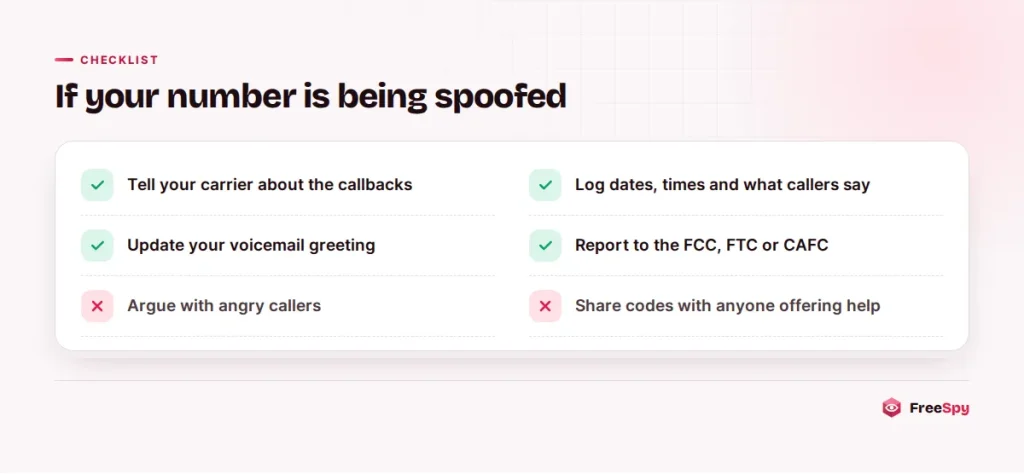
- Tell your carrier. Explain that you’re getting callbacks about calls you didn’t make. Ask them to confirm your account hasn’t been compromised and whether they can see unusual activity. Carriers can’t always stop spoofing, but they need the report.
- Keep a record. Note the date, time and caller for each callback or text you receive, and what they say the call was about. A simple list is enough, and it’s useful if the problem continues.
- Change your voicemail greeting. Something like: “If you received a call from this number, it wasn’t me. My number is being spoofed. Please don’t share personal information with that caller.”
- Report it. In the US, file a complaint with the FCC at fcc.gov/complaints and report the scam to the FTC at ReportFraud.ftc.gov. In Canada, report to the Canadian Anti-Fraud Centre at 1-888-495-8501. Under the US Truth in Caller ID Act, spoofing with intent to defraud or cause harm is illegal.
- Don’t argue with angry callers. Explain briefly, or let calls go to voicemail.
- Watch your number. Use the “watch this number” option on your number page to get an email when new reports appear.
Spoofing campaigns usually move on to new numbers after a few days or weeks. If it goes on for months, ask your carrier about changing your number.
Tips if you have a recycled number
- Update your accounts. Make sure your bank, email and other services that send text codes have your current number, and that the old owner’s accounts aren’t linked to it. Calls and texts for the old owner are a sign some aren’t.
- Tell callers once, then block. Debt collectors and businesses looking for the previous owner should stop after you tell them it’s a wrong number.
- Use the Safe rating. A Safe report saying “new owner since 2026” helps people reading old reports.
- Ask for removal if the history is heavy. Old reports about a previous owner’s sales calls are exactly the kind of thing a removal request is for.
Your privacy rights
FreeSpy doesn’t show owners’ names, addresses or relatives, and doesn’t sell personal data. Community reports describe calls, and comments that include personal information break the guidelines and are removed. If you see a report that contains your name or other personal details, flag it and contact us. You don’t need to wait for a full removal.
Depending on where you live, privacy laws may give you more rights over personal information that companies hold about you, such as the right to see it or ask for it to be deleted. Several US states have their own privacy laws, and in Canada federal and provincial privacy laws apply. Our privacy policy explains what we collect and how to reach us. This is general information, not legal advice. For your specific situation, check the official sources or speak with a lawyer.
Common questions
Will removal stop people from reporting my number in future?
Once a removal is approved, the reports section isn’t shown on your number’s page, so new reports aren’t displayed there. If something changes, contact us.
Does FreeSpy charge for removal?
No. Removal requests are free, and we’ll never ask you to pay to hide reports.
Can I remove someone else’s number?
Only if you’re authorized to act for the owner, for example as an employee of the business that owns it. You’ll need to confirm this when you submit.
My carrier labels my calls “Spam likely”. Can you fix that?
No. Carrier labels come from the carrier’s own analytics. Contact your carrier, or the carrier of the person you’re calling, to dispute the label.