You list a couch for sale, or post a flyer about a lost dog. A stranger texts back, interested and friendly, then asks for something odd: “I’m going to send you a code to make sure you’re real. Can you read it back to me?” A six-digit code arrives from Google a few seconds later.
Don’t send it. That code has nothing to do with you being real. It lets the stranger attach a Google Voice number to your phone number, and that new number will be used to scam other people. Google says its employees will never ask for the code, and the FTC’s advice is equally short: don’t share a verification code with anyone you didn’t contact first, whatever story they tell.
If you already sent it, you can undo most of the damage in a few minutes. The steps are further down.
What those six digits give the other person
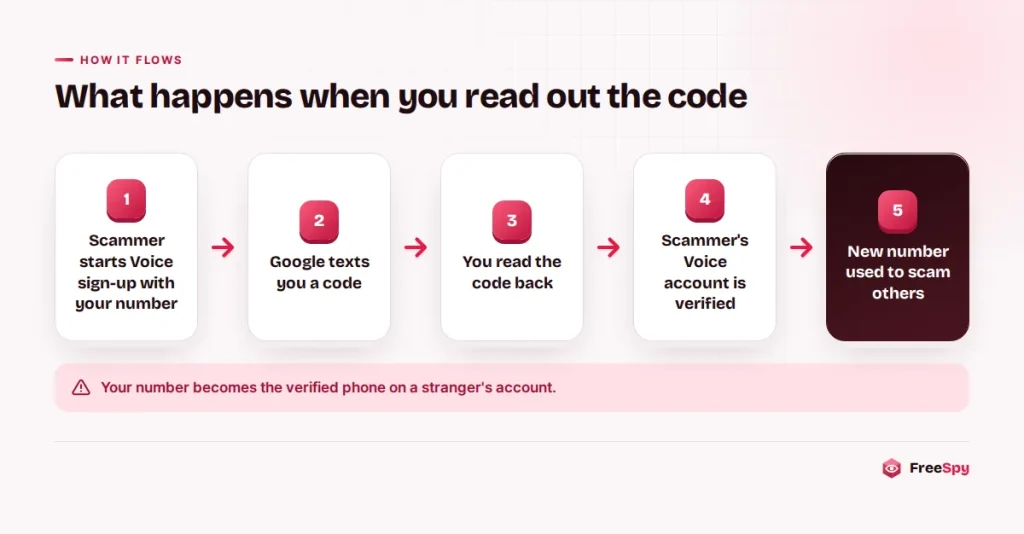
Google Voice gives people a phone number that works through an app. When someone sets up Voice, or adds a phone to their account, Google needs proof that they control the number they are linking. According to Google’s Voice Help pages, Voice provides a six-digit code for this. It texts the code to a mobile number, or calls a landline and reads it aloud. The person enters the code on their screen and clicks Verify.
The design assumes that only the owner of a phone can see texts arriving on it. That holds until someone talks the owner into reading the code out loud. At that point the scammer, not you, has passed Google’s check, and your number is listed as the verified phone on their Voice account.
The code does not confirm your identity to the other person. It doesn’t prove you’re “a real seller,” and it has nothing to do with the table or the dog. All it shows is that whoever types it in can see your texts.
The buyer who wants to “verify” you
The FTC’s consumer alert on this scam names two common settings: people who post items for sale on sites like Craigslist or Facebook Marketplace, and people searching for a lost pet. Both groups publish their phone numbers on purpose, and both are hoping for a quick reply from a stranger.
A marketplace exchange tends to look like this (the number is fictional):
(213) 555-0186: Hi, is the dining table still available? I can pick it up tomorrow.
You: Yes, it is.
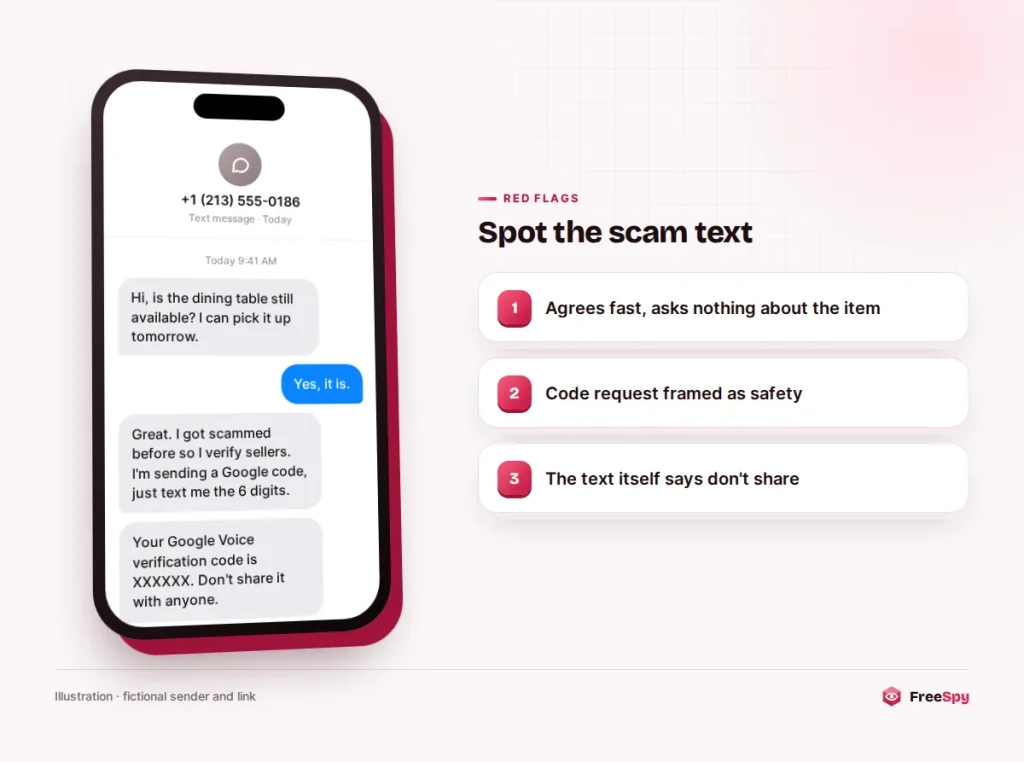
(213) 555-0186: Great. I’ve been scammed before on here, so I verify sellers first. I’ll send you a code from Google. Just send me the 6 digits.
The lost-pet version leans on emotion instead:
(503) 555-0122: I think I found your dog near the park. Brown, red collar? Before I hand him over, I need to make sure you’re the real owner. I’m sending a verification code now.
In both scripts the stranger plays the cautious one. That’s the clever part. The request sounds like a safety step, refusing feels rude, and the person actually at risk ends up reassuring the scammer.
Small twists on the same request
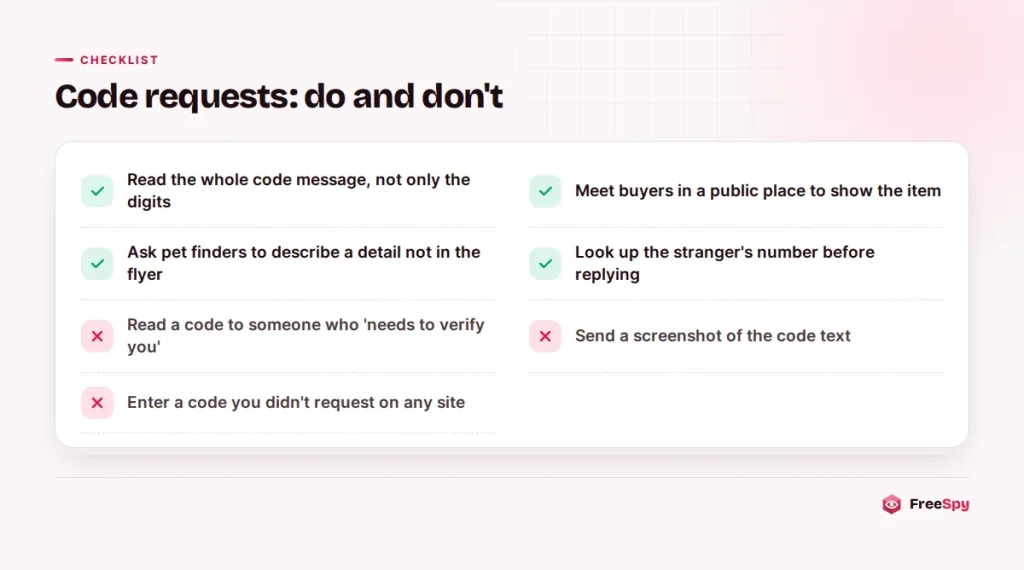
If you hesitate, the person may send a second code and say the first one expired, hoping you’ll answer faster the second time. Some ask for a screenshot of the text instead of the digits, which gives them exactly the same thing.
Others add a deadline: “I’m in the car outside, just send it so I can come to the door.” A real buyer can wait 30 seconds while you think.
And the move isn’t limited to Google. It works with codes from other apps and from banks. The FTC puts it plainly: anyone who asks you for your account verification code is a scammer.
Your number, their phone line
A Google Voice number looks like an ordinary US phone number. It can send texts and make calls, and it doesn’t carry the scammer’s real name. According to the FTC, once a scammer has the code, they can set up a Voice number linked to your phone number and use it to scam other people while hiding their identity.
That leaves you in an awkward spot. If the account is ever looked into, the verified phone on it is yours. Meanwhile the scammer has a fresh line to use on the next seller, the next pet owner or the next person who answers a text. Internet-based lines like this are popular with scammers for reasons that go beyond Google, and a stranger whose number turns out to be one deserves a second look.
The FTC flags a further risk. If a scammer collects enough of your information, they could impersonate you to get into your accounts or open new ones in your name. The code alone doesn’t hand over your Google account or your bank. It is often the opening of a longer conversation, though, so treat anything else that person asks for with the same suspicion.
A code can’t prove anyone is honest
Thinking through the logic makes the request easy to refuse. A verification code only proves that a phone can receive texts. Every working phone can do that, including phones owned by scammers. So the code tells a buyer nothing about whether you’re honest, whether the table exists or whether the dog is yours.
Real buyers and real finders check other things. They come to see the item, meet in a public place, or ask you to describe a mark on the dog that wasn’t in the flyer. Nobody needs a Google security code to decide whether to pick up a couch.
Warning: Google’s Voice Help page is direct: Google employees will never ask for this code. If a code arrives that you didn’t request yourself, ignore it.
Saying no without a debate
You don’t owe anyone an explanation, but a short reply can end things cleanly:
- “I don’t share verification codes. Happy to meet at the police station lot if you want to see the table.”
- “No codes, sorry. You can come see the dog and bring photos of him.”
- Or no reply at all. Block the number and move on.
Expect pushback. Scammers often answer with guilt (“I thought you were honest”), urgency (“I’ll buy something else then”) or more codes. None of that changes the answer.
A real buyer will still want the table after you say no.
Sent the code already? Disconnect your number first
Stop talking to the person. So far, the damage is that someone has linked your number to their Voice account, and Google gives you a way to reverse that.
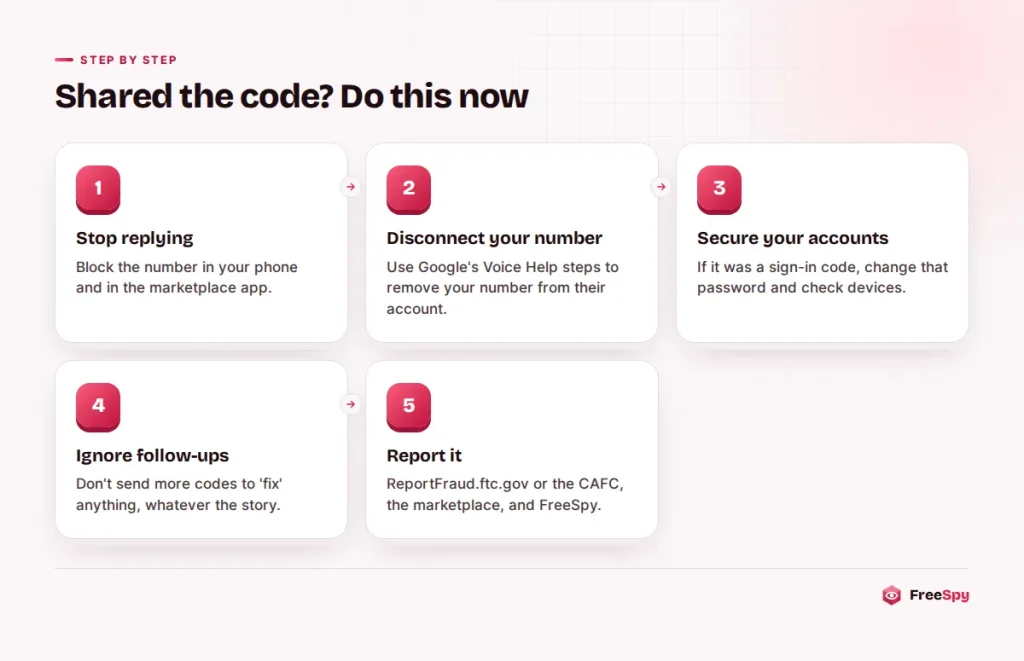
- Stop replying. Block the number in your phone and in the marketplace app. Don’t send more codes, photos or personal details.
- Disconnect your number from their Voice account. Google’s Voice Help page on protecting your verification code links to a page where you can disconnect your number, and Google says to use it if you aren’t a Voice user but were tricked into giving out a code. If you do use Voice, follow Google’s steps to reclaim your number so it’s linked to your own account.
- Check your Google account if the code was for something else. If the text was a sign-in code for your Google account rather than for Voice, change your Google password and review recent security activity and signed-in devices.
- Ignore follow-ups. A scammer who failed once may come back with a new story. Texts claiming your Voice account is “under review,” or asking for more codes to “fix” it, are part of the same scam.
- Report it. In the US, report the scam at ReportFraud.ftc.gov. Report the user to the marketplace too, so the profile comes down. A report on FreeSpy with the call type “text” and a note that they asked for a Google code warns the next person who looks the number up.
If the conversation went further and you gave out your full name, address, date of birth or a card number, there’s a fuller recovery checklist for that situation.
Read the whole text, not only the digits
Verification texts usually say which service sent them and what the code is for. Reading the full message takes two seconds and catches most of these tricks.
A code you didn’t request means someone else started a sign-in or setup with your number. Don’t share it, and don’t enter it anywhere either.
A code from a service you don’t use is just as telling. If you’ve never touched Google Voice and a Voice code arrives, someone is trying to link your number.
Many services now print “don’t share this code” right in the message. That line is the most important part of the text.
The same habit protects your other accounts. The FTC explains that a password alone usually isn’t enough to get into an account protected with two-factor authentication, which is why scammers work so hard to talk people into reading out the second factor.
Clues that show up before the code does
The code request is rarely the only sign. Watch for a buyer who agrees to your price instantly without asking a single question about the item, or who wants to move the conversation off the marketplace and onto text right away. A brand-new profile with no history is another hint, as is a name that doesn’t match the way the person writes. And someone who found your “lost” pet but can’t describe anything beyond what’s in your photo probably never saw the dog.
You can also check the number itself. A FreeSpy lookup shows the area code’s region, the number type and, when carrier data is available, the line type, such as non-fixed VoIP. Community reports and FTC Do Not Call complaints appear on the same page. An empty page doesn’t prove much, since scammers rotate numbers often, but a page full of “asked for a verification code” reports settles the question quickly.
In Canada, the trick wears a different logo
Google’s help pages say the personal versions of Google Voice are only available in the US, so this exact version mainly targets people with US phone numbers. Canadians still see the same “send me the code” request attached to other apps and accounts, and the answer doesn’t change.
Report code-request scams to the Canadian Anti-Fraud Centre online or at 1-888-495-8501. The CAFC asks people to report even when no money was lost, because reports help connect cases.
Where this sits among number-hijacking scams
A linked Voice account is one of several ways criminals borrow a victim’s phone number. In a SIM swap, a criminal convinces a carrier to move your number to their SIM card, which hands them your calls and texts. That’s a far more serious problem, and SIM swap and port-out fraud works very differently. What the two share is the target: the one-time codes that arrive by text. Keep those codes to yourself and you close the door on a large share of account takeovers.
Quick answers
Can someone get into my phone with this code?
No. The code doesn’t give anyone access to your phone, your messages or your contacts. It only links your number to their Voice account, which you can disconnect through Google.
Will I get calls meant for the scammer?
Possibly. A Voice account can forward calls to a linked phone, so you might see odd calls or texts. Google suggests disconnecting your number if you don’t want Voice forwarding calls to you.
Do I need to go to the police?
For a code alone, reporting to the FTC (or the CAFC in Canada) and the marketplace is usually enough. If you lost money or someone opened accounts in your name, file a police report as well.
Sources
- FTC: The Google Voice scam
- FTC: What’s a verification code and why would someone ask me for it?
- Google Voice Help: Protect your verification code
- Google Voice Help: Reclaim your Voice number
- Google Voice Help: Identify Google Voice subscription types
- Canadian Anti-Fraud Centre