Your phone suddenly shows “No service” in the middle of the afternoon. Restarting doesn’t help. Twenty minutes later your email password stops working. That is what a SIM swap feels like from the victim’s side: not a scam call, but a phone that quietly goes dead.
Someone has persuaded your carrier to move your number to a SIM or an account they control. Every call and text meant for you now goes to them, including the one-time codes that guard your bank and email. The fix starts with knowing how they did it, and it is a lot easier to block beforehand than to undo afterward.
Your number is the target, not your phone
Your SIM card, or the eSIM profile in newer phones, ties your number to a device. Carriers move numbers between SIMs every day for lost phones and upgrades. The scam abuses that routine: the criminal convinces the carrier that they are you and that “your” number should now live on their SIM.
Port-out fraud does the same thing across companies. The criminal opens an account at another carrier and asks to transfer your number there. Either way your phone loses service. The FCC also notes a low-tech version: physically stealing the victim’s SIM card.
The FCC explains the motive plainly: “Your mobile phone number may be the key to your most important financial accounts.” Many services text a code when you forget a password or log in from a new device. Whoever holds the number gets those codes, and with them, your email, bank and crypto logins.
Your phone itself is usually untouched. The attack happens at the carrier account level, which is why changing settings on the handset does nothing and only the carrier can reverse it.
Four ways criminals get the carrier to move it
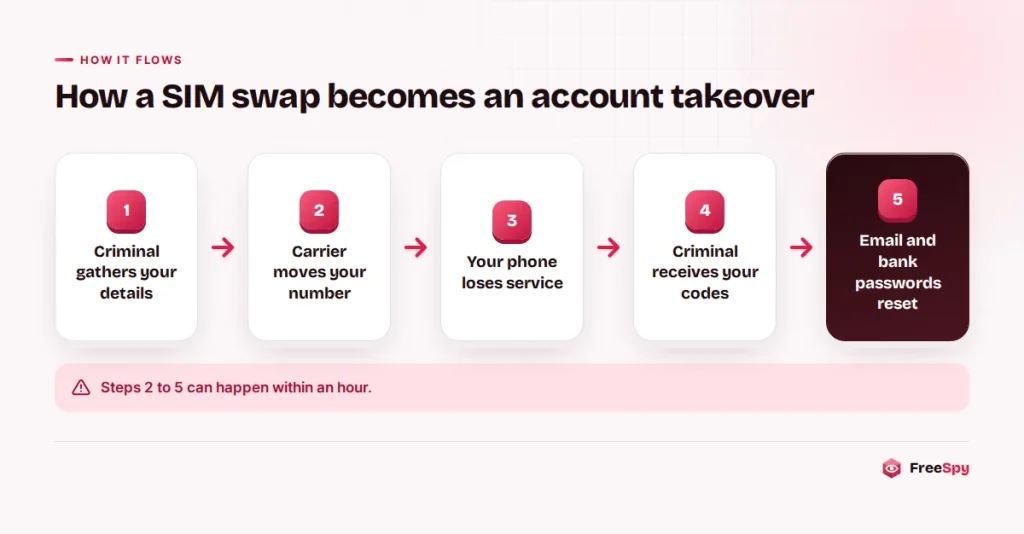
According to an FBI public service announcement, “Criminal actors primarily conduct SIM swap schemes using social engineering, insider threat, or phishing techniques.” In practice, the groundwork comes first. They piece together your name, address, date of birth and ideally the last digits of your Social Security or Social Insurance Number from data breaches, social media and earlier phishing.
Then they pick a route. Some call support or walk into a store posing as you, with a story about a lost phone. Some bribe or trick a carrier or retail employee, which is why the FBI urges carriers to tighten how employees verify customers. And many go after you first, to get the account PIN or a verification code that makes the change look legitimate.
That last route is the one you can stop on the phone. A typical script:
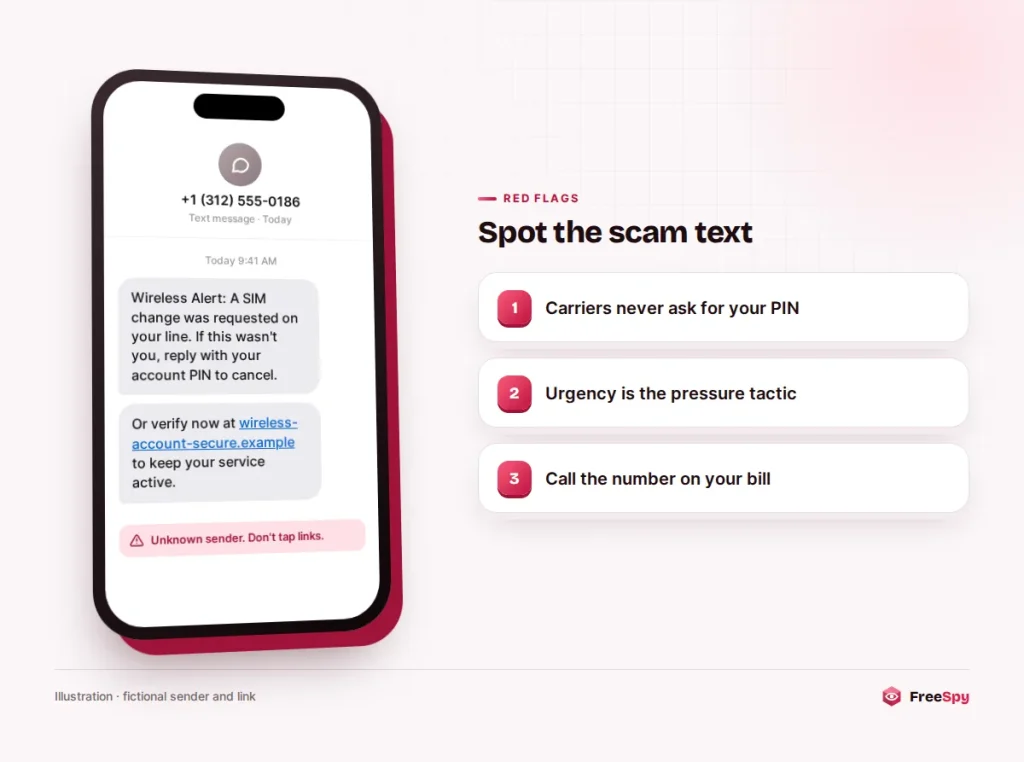
“Hi, this is the fraud department at your wireless provider. We’ve detected someone trying to move your number to another carrier. To block it, I’m sending a verification code to your phone right now. Please read it back to me so I can confirm you’re the account holder.”
The code that arrives is real, but it isn’t blocking anything. It approves a change or logs the caller into your carrier account. The same move powers the Google Voice code scam: a code sent to you is meant for you alone, and no real support agent needs it read back.
For a port-out, the criminal usually needs your account number and a Number Transfer PIN, which US carriers generate inside your online account. Anyone who gets into that account can create the PIN. Its password matters as much as your email password.
One year of complaints, five times the previous three
Exact counts are hard to find, because many victims report the bank or crypto losses rather than the phone takeover behind them. The FBI’s Internet Crime Complaint Center (IC3) said it received 320 complaints about this kind of hijacking from 2018 through 2020, with adjusted losses of about $12 million. In 2021 alone it received 1,611 complaints and more than $68 million in losses.
Those figures are old and count only reported cases. Still, the jump shows how quickly criminals adopted the method once they saw what a phone number could open.
It sits inside a much larger identity theft problem. According to the FTC’s 2025 Consumer Sentinel data, as summarized by Experian, consumers filed 1,358,253 identity theft reports in 2025. In Canada, identity fraud was the most-reported fraud type in the Canadian Anti-Fraud Centre’s 2025 figures, with 8,403 reports.
Dead phone, plus reset emails you didn’t ask for
The FTC lists the warning signs in its consumer alert on this scam. The first is a phone that loses service for no clear reason: in the FTC’s words, “no data, no text messages, no phone calls.” Wi-Fi may keep working, which can fool you into thinking the phone is fine.
Other signs tend to follow within minutes:
- a message from your carrier saying a SIM or eSIM was activated on a new device, or that a request to transfer your number came in
- verification texts that never arrive when you try to log in
- password-reset or new-login emails you didn’t trigger, especially from your bank, a payment app or a crypto exchange
- friends saying “you” texted them with odd requests
A dead phone alone proves nothing; networks have outages. Check the carrier’s outage page over Wi-Fi or ask someone on the same carrier. If their phone works, yours says “SIM not provisioned,” and account alerts are landing in your inbox, treat it as a takeover.
What the FCC’s 2023 rules make carriers do
On November 15, 2023, the FCC adopted rules aimed directly at this fraud. Wireless providers must use “secure methods of authenticating a customer” before moving a number to a new device or provider, and must notify customers when a SIM change or port-out request is made on their accounts. They must also “offer customers the option to lock their accounts to block processing of SIM changes and number ports,” train employees on this type of fraud, and keep records of SIM change requests.
The rules set a baseline and let carriers choose their own methods, so feature names differ. This is a consumer summary, not legal advice; for a dispute, read the FCC’s published order or talk to a lawyer.
In Canada, the Canadian Anti-Fraud Centre (CAFC) warns that victims “lose access to your mobile service” and are “typically locked out of all your accounts.” Ask your provider what it offers, such as an account PIN or extra checks before a SIM change, and switch on whatever it has.
Locks to turn on tonight
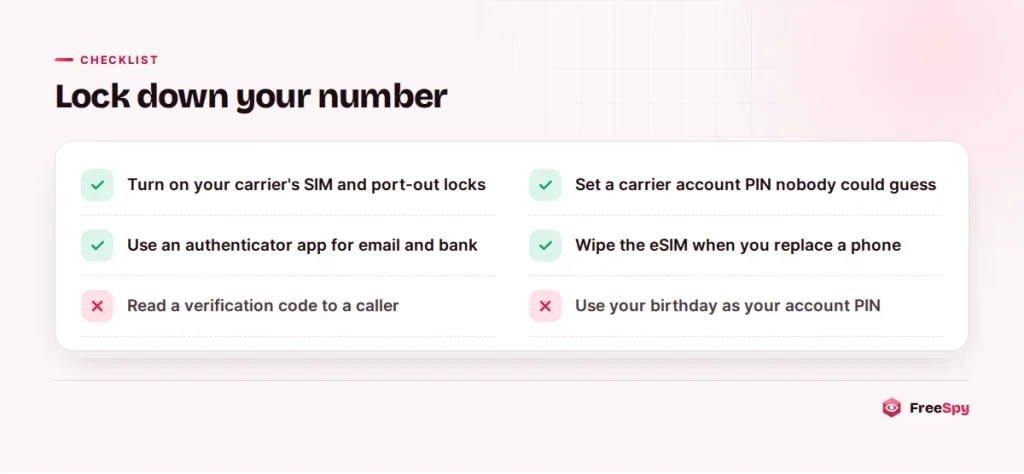
Start with your carrier’s own protections. Verizon offers SIM Protection, which “protects all or selected mobile numbers from unauthorized SIM or device changes,” and Number Lock, which “protects your mobile number from an unauthorized transfer.” T-Mobile offers SIM Protection and Port Out Protection. AT&T’s Wireless Account Lock blocks changes including “SIM and eSIM swaps and changes” and “Transferring number to or from another wireless carrier.” They live in the carrier’s app or account settings.
Then the rest:
- Add a PIN to the account. The FTC recommends that you “Set up a PIN or password on your cellular account.” Skip birthdays and ID digits, since the criminal may already have those.
- Give the carrier login a unique password and the strongest two-step option it offers.
- Move important accounts off text-message codes. The FTC notes that “text message verification may not stop a SIM card swap” and suggests you “use an authentication app or a security key.” Do your main email first, because it can reset everything else.
- Post less about yourself. The FBI advises against putting your phone number and personal details online.
- Wipe old devices. The FCC says consumers “should always wipe their eSIM data when they replace their phones.”
Warning: A real carrier will never ask you to read back a verification code or your account PIN during a call it started. If that happens, hang up and call the number printed on your bill.
No service and strange emails: the first hour
If the signs match, work fast and in this order.
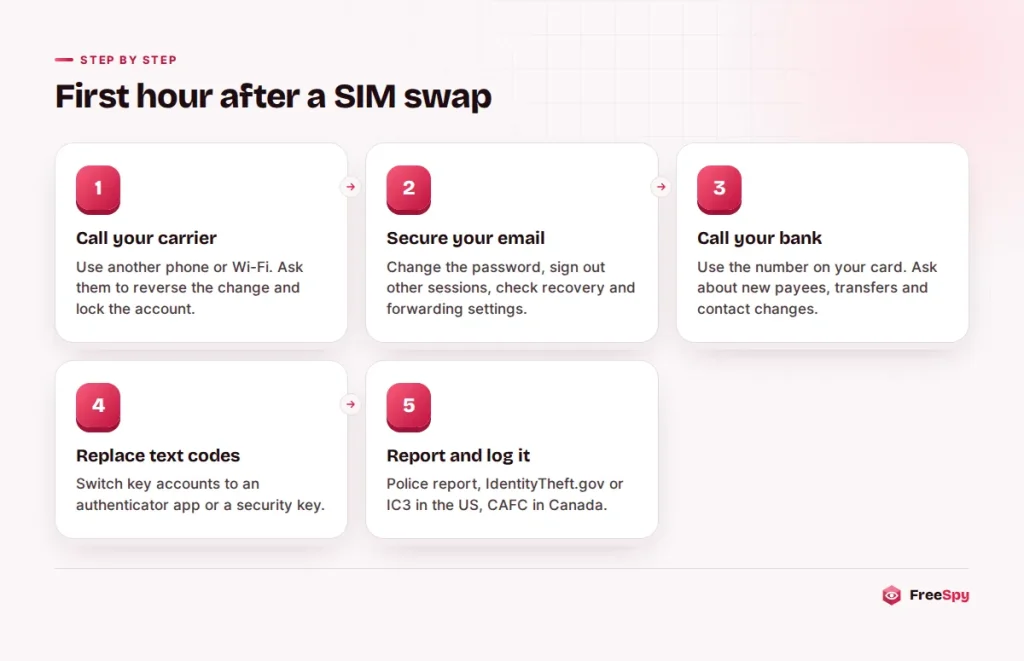
- Reach your carrier from another phone or over Wi-Fi. The FTC’s advice is to “Contact your cellular service provider immediately to take back control of your phone number.” Ask them to reverse the change, add every lock and give you a reference number. If the number was ported, the FCC also advises notifying the provider holding the fraudulent account.
- Secure your email. From a trusted device, change the password, sign out other sessions, and check recovery details and forwarding rules.
- Call your bank and card issuers using the numbers on your cards. The FTC says to “Check your credit card, bank, and other financial accounts for unauthorized charges or changes.” Card and bank disputes have set processes; crypto transfers are much harder to recover, so speed counts.
- Change passwords on every account that relied on text codes, and move them to an authenticator app or security key.
- Protect your credit. The FCC suggests a fraud alert with one of the three major credit bureaus. A credit freeze goes further, and there is a step-by-step plan for freezing credit and protecting exposed details in both countries.
- Report it. File a police report, as the FCC recommends. In the US, use IdentityTheft.gov if personal information was compromised, and report losses to the FBI at ic3.gov. In Canada, report to the CAFC online or at 1-888-495-8501.
- Keep a log of every call and reference number. The carrier’s reference number is your evidence that the number was taken.
When you call the carrier, say it plainly so you reach the right team:
“My line lost service and I believe my number was moved to another SIM [or ported to another carrier] without my permission. I need the change reversed, a lock placed on the account, and a fraud case opened. Can you give me a reference number?”
What a number lookup can and can’t show
A FreeSpy number page shows the original carrier and rate center of the number’s exchange from NANPA and CNAC numbering data. When a carrier-data provider is connected, it can also show the current carrier, line type and porting status. Wireless number portability has existed in the US since November 24, 2003, so a current carrier that differs from the original one is normal and says nothing about fraud.
A lookup can’t see a swap inside the same carrier at all. Your carrier account is the source of truth.
Where a lookup helps is with the fake “carrier” calls and texts that come before an attack. Check the number for reports before you engage, but don’t treat a clean or familiar-looking number as proof, because spoofed caller ID can show almost anything.
If you got one of those calls or texts, add a report under “smishing” or “scam” and mention that the caller wanted a code or PIN. That detail is what warns the next person.
Two quick answers
Can criminals move a number to an eSIM, or only to a physical SIM card?
Both. An eSIM is a digital profile, and carriers can move a number to a new eSIM as easily as to a new card. Carrier locks cover both; AT&T’s Wireless Account Lock, for example, lists “SIM and eSIM swaps and changes” among the blocked actions.
Will a number lock stop me from switching carriers later?
Yes, until you turn it off. Verizon, for example, says numbers with Number Lock enabled cannot generate a Number Transfer PIN. When you want to switch, turn the lock off, make the move, then turn protection on at the new carrier.
Sources
- FCC news release, November 15, 2023
- FCC Report and Order 23-95
- FCC: Cell Phone Fraud
- FBI IC3 PSA on SIM swapping
- FTC consumer alert
- CAFC: SIM card swap
- CAFC: Top frauds of 2025
- Experian summary of FTC 2025 data
- Verizon, T-Mobile and AT&T help pages on account locks