A text arrives about a package that couldn’t be delivered, a toll you forgot to pay, or a charge your bank wants you to confirm. It’s short, it sounds routine, and it has a link. That link is the whole scam.
Scam texts, often called smishing (SMS phishing), cost almost nothing to send and are easy to fall for on a small screen. The useful skills are narrow: recognize the five scripts that make up most of them, read a link before you tap it, and know what to do in the first hour if you already typed something in.
A sentence, a link, and no voice to give it away
A text lands on a device people check constantly, and it has room for only a sentence or two, which is just enough for a believable alert and a link. There’s no voice that might sound wrong and no long email full of clues. On a phone screen you also can’t easily see where a link really goes.
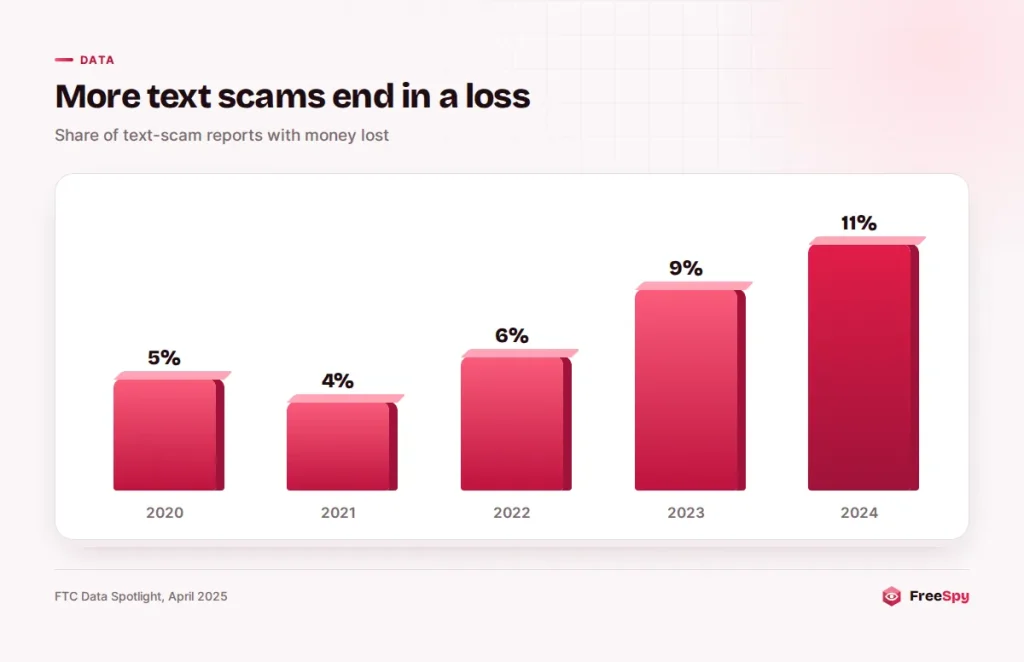
The FTC’s Data Spotlight on text scams found reported losses of $470 million in 2024, more than five times the 2020 figure. The share of text-scam reports that involved money lost also rose, from 5% in 2020 to 11% in 2024. Either fewer people shrug these texts off, or the scams have gotten better at closing.
The trend continued in 2025. Experian’s summary of the FTC’s 2025 data counts 411,424 reports of scams that began with a text, $639 million lost and a median loss of $1,000. Texts are now a more common starting point for fraud reports than phone calls or email.
Five scripts behind half the reports
According to the FTC, these five made up about half of all text-scam fraud reports in 2024.
The package that’s “on hold”
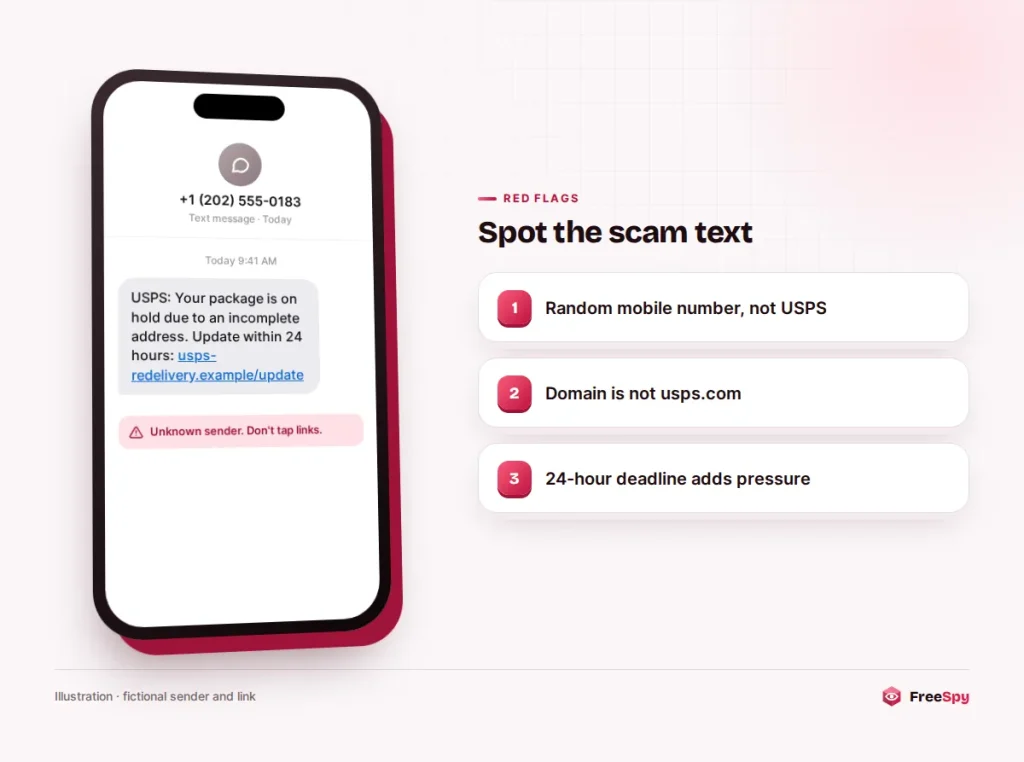
“USPS: Your package is on hold due to an incomplete address. Update within 24 hours: [link]”. The link opens a copy of a delivery company’s site that asks you to confirm your address and pay a small redelivery fee.
The fee is a cover story. The goal is your card number, and sometimes your name, address and date of birth too. These texts work because almost everyone is expecting a package at some point.
A job you never applied for
A “recruiter” offers remote work with flexible hours and good pay, usually without any application on your part, then moves the conversation to a messaging app. Many of these turn into task scams: you “rate products” or “optimize apps” on a website that shows rising earnings, until you’re told to deposit money, usually crypto, to continue or to withdraw.
Real employers don’t recruit by unsolicited text and don’t ask you to pay to get paid. The task-scam pattern has a few stages worth recognizing early.
“Did you approve a purchase of $899?”
The text appears to come from your bank or a big retailer such as Amazon and asks you to reply YES or NO. Whatever you answer, a call follows from the “fraud department”, which then tries to talk you into moving money to a “safe account” or reading back a one-time code.
The text is only the opener for a phone scam. How a real bank fraud alert differs from the fake one is the thing to know before your phone rings.
A toll you supposedly skipped
Modelled on electronic toll systems such as E-ZPass, SunPass or FasTrak, these texts say you owe a small toll and will be charged a late fee or lose your licence if you don’t pay today. The link leads to a fake payment page. They often reach people who never drive on toll roads, which is a useful clue in itself.
The “wrong number” that keeps chatting
“Hi David, is the dinner on Friday still on?” The message is meant for “someone else”. Reply politely and the sender apologizes and starts chatting. Over days or weeks the conversation becomes a friendship or a romance, and eventually turns to a crypto or gold “investment” that shows great returns until you try to withdraw.
The FTC lists this among the top text scams because the losses can be very large. The long con behind wrong-number texts is often called pig butchering.
Clues before you even reach the link
Look at who sent it. Many companies send account alerts from short codes, five- or six-digit numbers, or from inside their own app. A “bank” text from an email address, or from an ordinary ten-digit number in a state where you’ve never lived, is a mismatch worth noticing.
Look at the greeting. Real alerts tied to your account usually know your name or show part of an account number you can check. “Dear customer” with no detail is a mass mailing.
And look at the clock. “Within 24 hours”, “today”, “final notice”: a deadline in a text is there to stop you from opening the company’s app and checking for yourself.
Reading a link from right to left
You don’t need to be technical to read a link. You need to find one thing, the domain, and check whether it belongs to the company the text claims to be from.
- Find the first single slash after the “https://” part. Everything after it, the path, can say anything, including “usps” or “bank”, and means nothing.
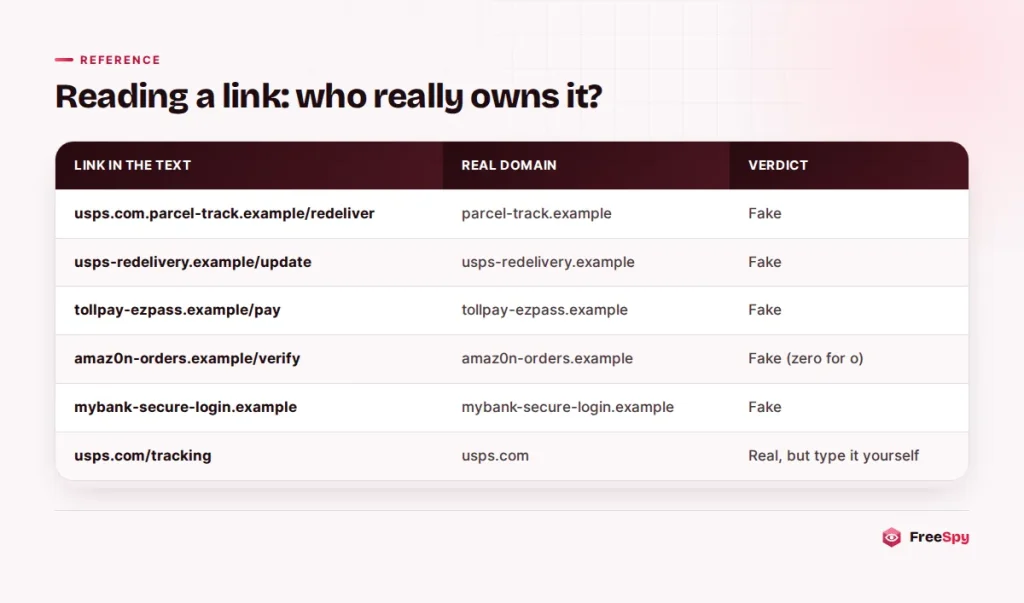
- Read the domain from right to left. The real owner is the name just before the ending (.com, .org, .gov, .ca). In
usps.com.parcel-track.example/redeliver, the owner isparcel-track.example, not usps.com. - Watch for extra words and hyphens. A brand name plus words like “redelivery”, “tollpay”, “secure” or “verify” is usually someone else’s domain.
- Look for swapped characters, such as a zero in place of an “o” or “rn” pretending to be “m”.
- Distrust shortened links that hide the destination. A real delivery company or bank has no reason to hide its own name.
Better still, skip the link. If a text says you have a package, a toll or a bank problem, open the company’s app or type its website address yourself and look there. If the problem is real, it’ll show up in your account.
Tapped, replied, or typed something in
If you only tapped the link and closed the page without typing anything, the risk is usually low. The site may record that your number is active, which can bring more scam texts. Keep your phone’s operating system and browser updated, and don’t install anything the page offers. On Android especially, a page that asks you to download an app to “track a package” is a serious warning sign.
If you replied, you confirmed that a real person reads messages on that number. With the fake fraud alert, a reply is often what triggers the follow-up call. Don’t reply “STOP” to a text you suspect is a scam, since for scammers that’s just another confirmation. “STOP” is for messages from real businesses you signed up with.
If you entered information, what to do depends on what you typed. That’s covered at the end of this page.
7726 first, then the junk button
Forward the text to 7726 (the digits spell SPAM). Your carrier uses these reports to find and block senders, and may reply asking for the number the text came from. On iPhone, press and hold the message, tap More, then the forward arrow. On Android, press and hold the message and choose Forward or Share. Most carriers in the US and Canada accept 7726 reports.
Then report it inside your messaging app. In Apple Messages, use the Report Junk link under a message from an unknown sender. In Google Messages, press and hold the conversation, tap Block, and leave “Report spam” checked.
If you lost money or shared information, report to the FTC at ReportFraud.ftc.gov, or in Canada to the Canadian Anti-Fraud Centre online or at 1-888-495-8501. A FreeSpy report on the sending number, with the call type “text” and the category “smishing”, warns people who look it up later.
Scam texts often come from random mobile numbers, email addresses or numbers that change with each message, so blocking one sender does little. Reporting helps more, because it feeds the filters that catch the next one.
Filters that keep most of them out of sight
iPhone
Open Settings → Messages (on newer iOS versions, Settings → Apps → Messages) and turn on Filter Unknown Senders under Message Filtering. Texts from numbers that aren’t in your contacts, and that you haven’t replied to, go into a separate Unknown Senders list with no notifications. You can still check that list for one-time codes or delivery updates you’re expecting. Spam filtering apps you install are switched on in the same Message Filtering section.
Android (Google Messages)
In Google Messages, tap your profile picture or the menu, open Messages settings, then Spam protection, and turn on Enable spam protection. Suspected spam moves to a Spam & blocked folder with a warning. Phones that use a different messaging app, such as Samsung Messages, have similar block and spam settings in that app’s menu.
Filtering won’t catch everything and doesn’t replace checking links, but it means most scam texts never reach your main inbox.
Typed in your card number? Call the issuer now
Move quickly. Stolen card numbers are often used within hours, and a card cancelled early limits the damage.
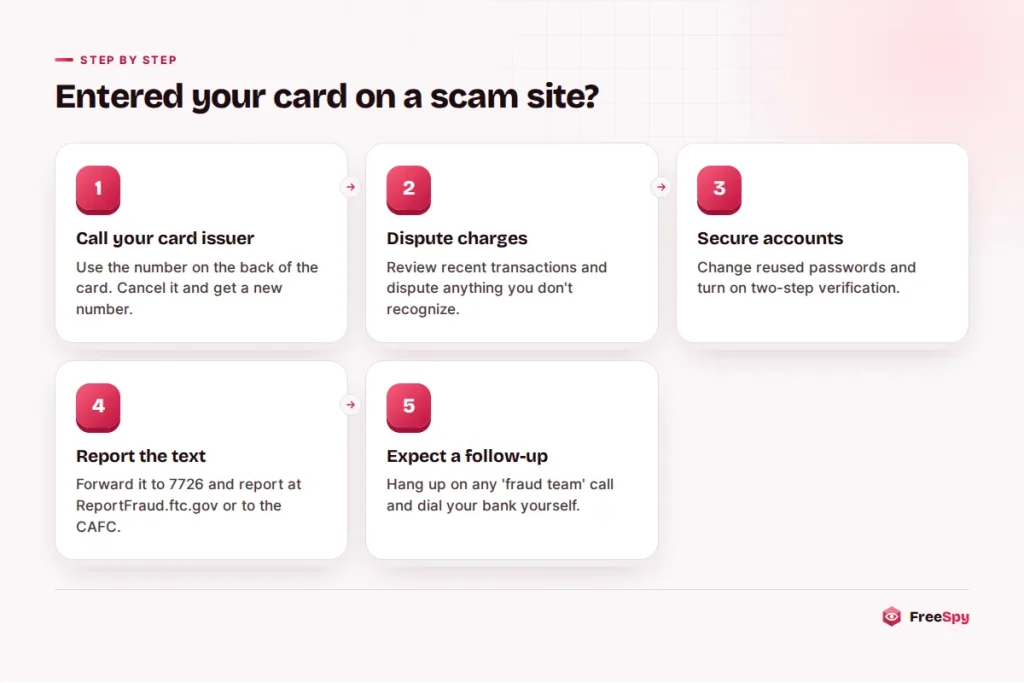
- Card number: call your card issuer on the number on the back of the card. Ask them to cancel the card, issue a new number and review recent charges, and dispute anything you don’t recognize.
- Bank or account login: change the password through the official app or website, turn on two-step verification, and tell the bank. If you used the same password elsewhere, change it there too.
- One-time code: if you typed or read out a verification code, assume the account was accessed. Change the password and look for new devices, payees or changes to your contact details.
- Social Security number, SIN or date of birth: in the US, IdentityTheft.gov builds a recovery plan, and a credit freeze is worth considering. In Canada, contact your bank and the credit bureaus, Equifax and TransUnion.
- An app you installed: uninstall it, run a security scan and change important passwords from a different device.
Expect a follow-up. People who fall for a scam text are often called later by someone posing as the bank’s fraud team or a government agency. If anyone calls about the incident, hang up and call back on a number you look up yourself.
Two quick questions
Is it dangerous just to open a scam text?
Opening and reading the message is generally safe. The risk comes from tapping the link and entering information, installing something, or replying.
Do USPS or toll agencies ever send texts with payment links?
Treat any unexpected text asking for payment as suspect. Even if a company sends alerts you signed up for, you can check by typing its official website yourself or opening its app instead of using the link.
Sources
- FTC Data Spotlight: top text scams of 2024 (April 2025)
- Experian: identity theft and fraud statistics (FTC 2025 data)
- ReportFraud.ftc.gov and IdentityTheft.gov
- Canadian Anti-Fraud Centre