The phone rings and a calm voice says it’s calling from Microsoft, Apple or Amazon. Your computer is sending error reports, or someone ordered an expensive phone on your account, or your Apple ID has been hacked. The agent can fix it right now, as long as you install one small program.
That program gives a stranger control of your computer. The “fix” is the scam.
The quickest test is who started the contact. Microsoft says that if you didn’t ask it to, it won’t call you to offer support. The FTC goes further: legitimate tech companies won’t contact you by phone, email or text about a problem with your computer. If the call came to you, or a pop-up told you to call, you’re not talking to real support.
Half the money comes from people over 60
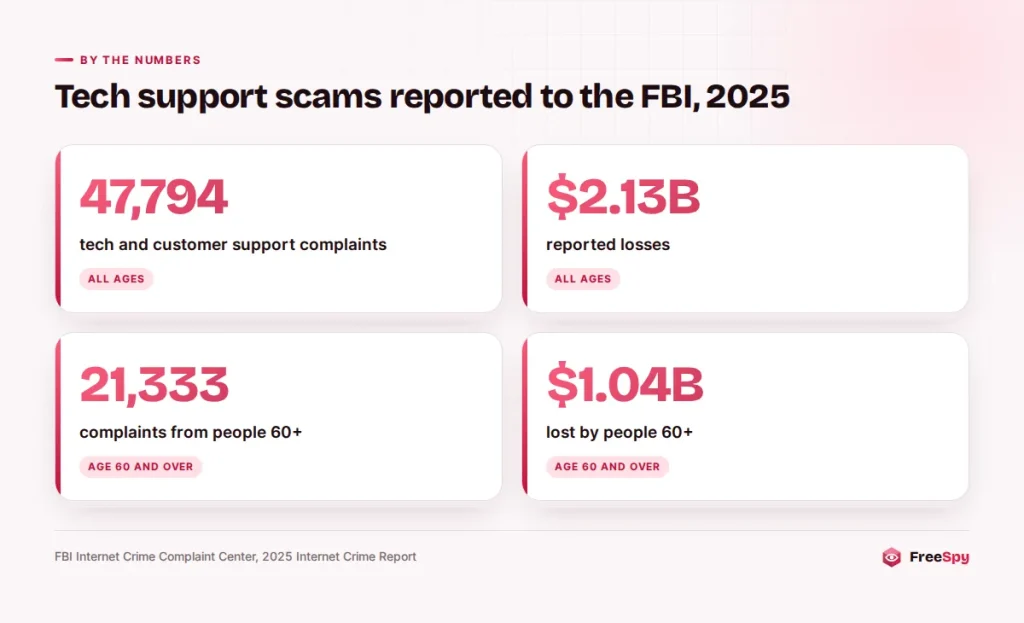
This is one of the most expensive frauds reported to the FBI. According to the FBI’s Internet Crime Complaint Center (IC3) 2025 annual report, people filed 47,794 complaints about tech and customer support scams, with reported losses of about $2.13 billion.
In the same report, people aged 60 and over filed 21,333 of those complaints and lost about $1.04 billion. One age group accounts for roughly half of all losses in the category.
In Canada, the Canadian Anti-Fraud Centre counts this fraud under “service” scams. The CAFC’s 2025 figures show 3,393 service fraud reports and about $19.5 million in losses. It describes unsolicited calls from someone claiming to work for Microsoft or another well-known computer company, along with alarming pop-ups that demand you call a number.
Cold calls, pop-ups and fake refunds
These scams reach people by phone in three main ways, and knowing which one you’re in makes it easier to spot.
The cold call about “errors”
The caller claims your computer has a virus, your license has expired, or “our servers detected suspicious activity from your IP address.” A typical opening:
“Hello, this is the Windows technical department. We are receiving error messages from your computer. Are you in front of it now? I need you to press two keys so I can show you the problem.”
Next they may have you open a technical screen full of system logs and point to ordinary warnings as “proof” of infection. Those warnings prove nothing. Every working computer logs routine warnings, and the caller can’t see your machine unless you let them in.
The pop-up with a phone number
You’re browsing and a full-screen warning appears, sometimes with a siren sound, saying your computer is locked and showing a toll-free number. The FTC says these fake pop-ups are a common start, and that real security warnings will never ask you to call a phone number. Microsoft says its error and warning messages never include phone numbers.
If a pop-up has frozen your screen, close the browser. If it won’t close, restart the computer. Don’t call the number.
The order you never placed
A call or voicemail says Amazon is processing a large order, or that your antivirus subscription will renew for several hundred dollars. “Press 1 to cancel,” or “call us back to stop the charge.” When you call, the agent needs to connect to your computer to “process the refund.” The FTC has warned about these fake refund calls: scammers offer a refund for past services, then push you to hand over control of your computer or your payment details.
Microsoft, Apple and Amazon have each said what they won’t do
You don’t have to guess. The three companies scammers most often borrow have all published rules you can hold a caller to.
Microsoft states that it won’t call you to offer support unless you asked, and that its error messages never contain phone numbers. It takes reports at microsoft.com/reportascam.
Apple’s advice is to hang up if you get an unsolicited or suspicious call from someone claiming to be Apple or Apple Support. It warns that a scammer may call from what appears to be a legitimate Apple number, so the caller ID screen proves nothing. Apple also says it never asks for your Apple Account password or verification codes to provide support.
Amazon says it won’t ask for payment over the phone or by email, won’t ask you to buy a gift card, won’t ask you to download software or grant remote access to reach customer service, and won’t charge for customer service.
When the “technician” hands you to a fake bank agent
The scam has grown into something worse than a fake virus cleanup. The FTC has described a layered version in which the computer call is only the first act.
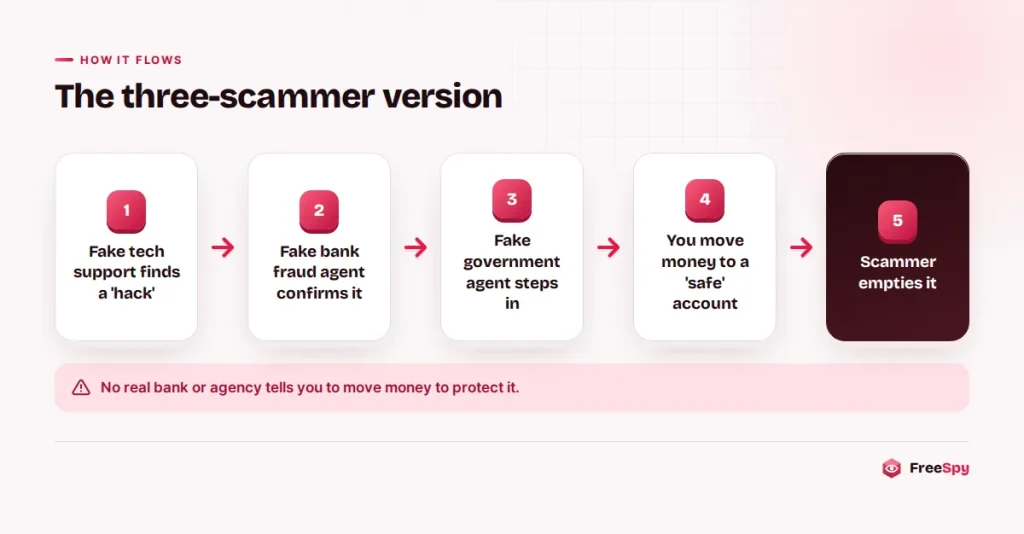
- The fake technician connects to your computer and “finds” that hackers got into your bank, investment or retirement account.
- Someone claiming to be your bank’s fraud department takes over, either by transfer or in a separate call, and confirms the bad news.
- A fake government agent joins last. They say the only way to protect your money is to move it to a new “safe” account, buy gold, withdraw cash for a courier, or buy cryptocurrency.
The safe account belongs to the scammer, and according to the FTC they clean it out quickly. Each layer makes the next more believable, because three “officials” seem to agree. The middle step is its own well-worn script, and fake fraud-department calls often arrive without any computer involved at all.
Warning: The FTC says only a scammer will tell you to move money to protect it. No bank, agency or tech company does this. Hang up the moment you hear it.
Real support starts with you
Real support exists, and sometimes you do talk to a company on the phone. The difference almost always comes down to who made contact and how they want to be paid.
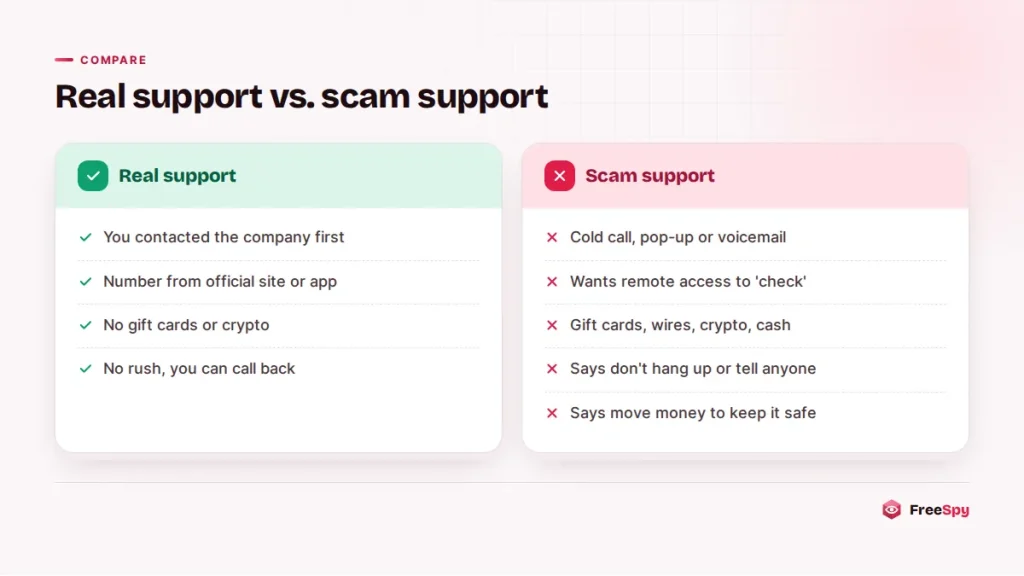
Real support usually happens because you reached the company through its own app, its website or a number listed there. A cold call, a pop-up or an unexpected voicemail is the scammer’s doorway.
A technician you contacted may use screen sharing to look at a problem you reported. A stranger who wants remote access to check for a problem you didn’t know you had is a different thing entirely.
Payment gives the game away too. The FTC says these scammers often insist on gift cards, wire transfers, bank transfers, cryptocurrency or a payment app. No real company wants gift cards to fix a laptop.
Then there’s the pressure: don’t hang up, don’t tell your bank, “the hackers are watching right now.” The FBI’s IC3 advice is simply to resist the pressure to act quickly.
Be careful even when you start the contact. The FTC notes that scammers try to get fake support numbers into search results and ads, and IC3 warns to be cautious of support numbers found through open searches. Take the number from the company’s own site or app; there are a few more ways to confirm a company’s number before you dial.
Three sentences that end the call
You don’t need a clever comeback.
- “I don’t accept support calls I didn’t request. Goodbye.”
- “I’ll contact Microsoft myself through its website.” Then hang up, even if they keep talking.
- “I’m not installing anything.” Then hang up.
Don’t stay on the line to argue or to waste their time. The longer you talk, the more chances they have to frighten you, and staying on confirms that your number reaches a live person.
They’re on your computer: cut the connection, then the passwords
Work in this order. The first steps matter most because the scammer may still be connected.
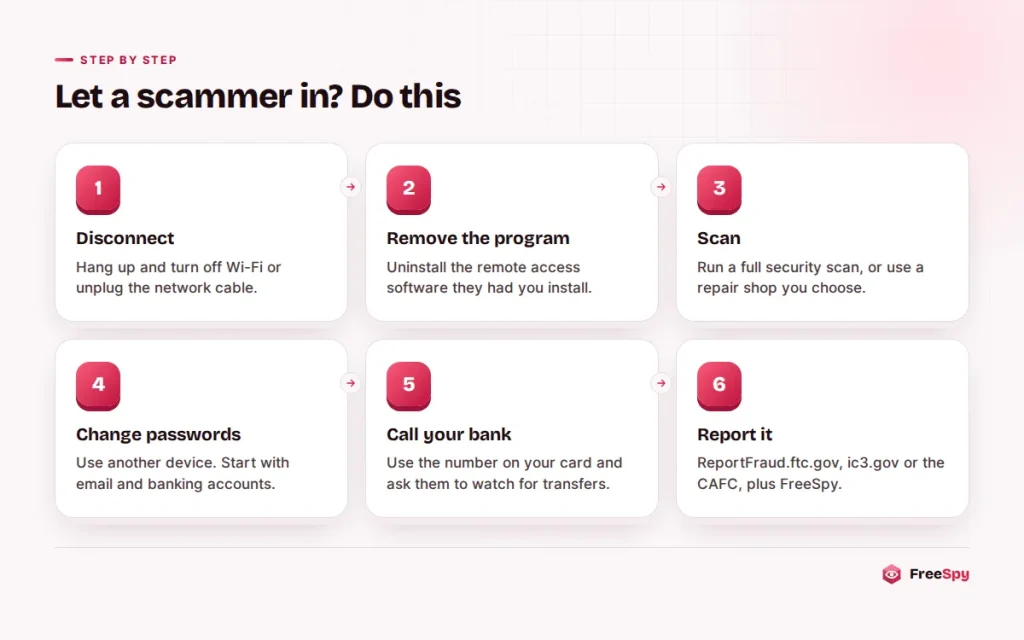
- Disconnect. Hang up, then turn off Wi-Fi or unplug the network cable so the remote session ends.
- Remove the remote access program. Uninstall whatever they asked you to install. If you aren’t sure which one it was, look at recently installed programs.
- Scan the computer. Run a full scan with your security software. If you don’t trust the result, have a repair shop you chose yourself check it.
- Change passwords from a different device. Start with email and banking, then any account you logged into while they were connected. The FTC says that if you gave a scammer your username and password, change it right away, and change it on any other site where you reused it.
- Call your bank and card companies. Use the number on the back of your card. Tell them you gave remote access to a scammer, and ask them to watch for transfers and reverse unauthorized charges.
- Turn on two-factor authentication for email and financial accounts, and never read the codes to anyone.
Paid by credit card? Contact the issuer quickly and dispute the charge. Paid with gift cards? Call the gift card company right away, because sometimes the funds haven’t been spent yet.
Then expect a second call. Scammers often come back offering a refund, or posing as a “recovery” service that can get your money back for a fee. The FBI warns that people claiming they can recover lost funds may be running another scam. Treat any such call as part of the first one.
Where to report it
In the US, report to the FTC at ReportFraud.ftc.gov and to the FBI at ic3.gov, especially if you lost money. In Canada, report to the Canadian Anti-Fraud Centre online or at 1-888-495-8501, and to local police if money is gone.
Tell the company that was impersonated as well: Microsoft at microsoft.com/reportascam, Apple at [email protected] for suspicious messages, and Amazon through its self-service reporting tool or [email protected]. A number report on FreeSpy under the “tech support” category also warns whoever looks that number up next.
Look up the callback number before you dial
When a voicemail or pop-up gives you a number, check it first. A lookup shows community reports, FTC Do Not Call complaints and a risk score with every factor listed.
Many of these operations use 800 and 888 numbers to look official, so a toll-free prefix proves nothing on its own. A clean result doesn’t make a number safe either, because scammers switch numbers often. The rule from the top still decides it: if they called you, or a pop-up told you to call, it isn’t real support.
Rules to tape next to a parent’s computer
Since older adults carry about half of the reported losses, a short conversation with older relatives is worth more than any software. Give them three rules to keep by the keyboard:
Microsoft, Apple and Amazon don’t phone people about computer problems.
Nobody who calls gets to connect to this computer.
Money never moves because someone on the phone says it’s in danger.
Then offer to be the person they call before doing anything a caller asks. Turning on spam call filtering on their phone cuts down how often they have to use those rules.
Sources
- FBI IC3: 2025 Internet Crime Report
- FBI IC3: Tech/Customer Support and Government Impersonation
- FTC: How to spot, avoid, and report tech support scams
- FTC: New tech support scammers want your life savings
- FTC: Hang up on fake “refund calls”
- Microsoft Support
- Apple Support: Recognize and avoid social engineering schemes
- Amazon: How to avoid Amazon impersonation scams
- Canadian Anti-Fraud Centre: Service scams
- Canadian Anti-Fraud Centre: Top frauds of 2025